DroneBundle is drone fleet management software with its own MCP server, and it is listed in ChatGPT's app directory. Connect it to ChatGPT or Claude and ask about your flights, pilots, jobs, equipment and maintenance in plain language. The connection reads your live workspace, signs in as you, and cannot change a single record.
A drone MCP server is the piece that lets an AI assistant look things up in your drone software. MCP stands for Model Context Protocol, an open standard that ChatGPT, Claude and other assistants use to connect to outside tools. Once your fleet software has one, you stop clicking through pages to find an answer. You ask.
DroneBundle has run a drone MCP server in production since June 2026, on every plan. In September 2026 it was approved for ChatGPT's app directory, where it sits under Business & Operations as DroneBundle: Ask about drone operations. The same connection works in Claude.
What a Drone MCP Server Does
A drone MCP server gives an AI assistant a safe, defined way to read your drone operation's records and answer from them. Without it, ChatGPT or Claude only knows what you paste into the chat. With it, the assistant can look up your jobs, flights and pilots on its own, combine them, and reply in a sentence.
Anthropic introduced the Model Context Protocol in November 2024 as an open standard, and OpenAI adopted it for apps in ChatGPT. That shared standard is why one connection address works across assistants instead of needing a separate integration for each.
The difference shows up in the questions you can ask. "Which jobs are overdue?" needs a list of jobs with dates. "Which jobs are overdue, and is the assigned pilot free next week?" needs jobs, assignments and the Pilot Schedule together. An assistant connected through MCP can pull all three and answer in one go, the same way it would if a colleague had the whole workspace open.
DroneBundle in ChatGPT and Claude
DroneBundle is the drone operations platform that ChatGPT and Claude can read end to end: projects, jobs, flights, pilots, equipment, maintenance, safety, clients, invoices, documents, project discussions and job-site weather. That is the full scope listed on its ChatGPT directory page, and it covers the parts of a drone business that sit around the flights, not only the flights themselves.
Three things set it apart from other drone tools with an AI connection:
- The whole business, not one slice. Flight logs, the Pilot Schedule, the risk register, client invoices and the sales pipeline all answer to the same question. One prompt can cross all of them.
- Listed in ChatGPT's directory. OpenAI reviewed and approved DroneBundle's app in September 2026. You find it inside ChatGPT, connect, and sign in. There is nothing to install or host.
- Every plan includes it. Solo at $199 a month, Team at $499 and Enterprise from $1,490 all come with the connection. There is no AI add-on to buy.
It also sits alongside the other ways DroneBundle connects to your systems. API keys, webhooks and Zapier move data between DroneBundle and your own tools. The MCP server is the plain-language way in for people.
Questions You Can Ask About Your Fleet
Ask the way you would ask a person who has the whole operation in front of them. These are examples of what a connected assistant can answer from a DroneBundle workspace, grouped by the part of the business they touch.
Jobs and projects
- "Which jobs are overdue, and who is assigned to them?"
- "Summarize the Riverside bridge project: open jobs, flights flown, files delivered."
- "What changed in the workspace since Friday?"
Pilots and the schedule
- "Who are my busiest pilots this month?"
- "Which jobs next week still need a pilot?"
- "Is anyone short on shift coverage for Thursday?"
Flights and flight logs
- "How many flights did we fly last month, and how many hours in the air?"
- "Which scheduled flights still have no outcome recorded?"
- "Show the flights for the solar farm job, with pilot and duration."
Equipment and maintenance
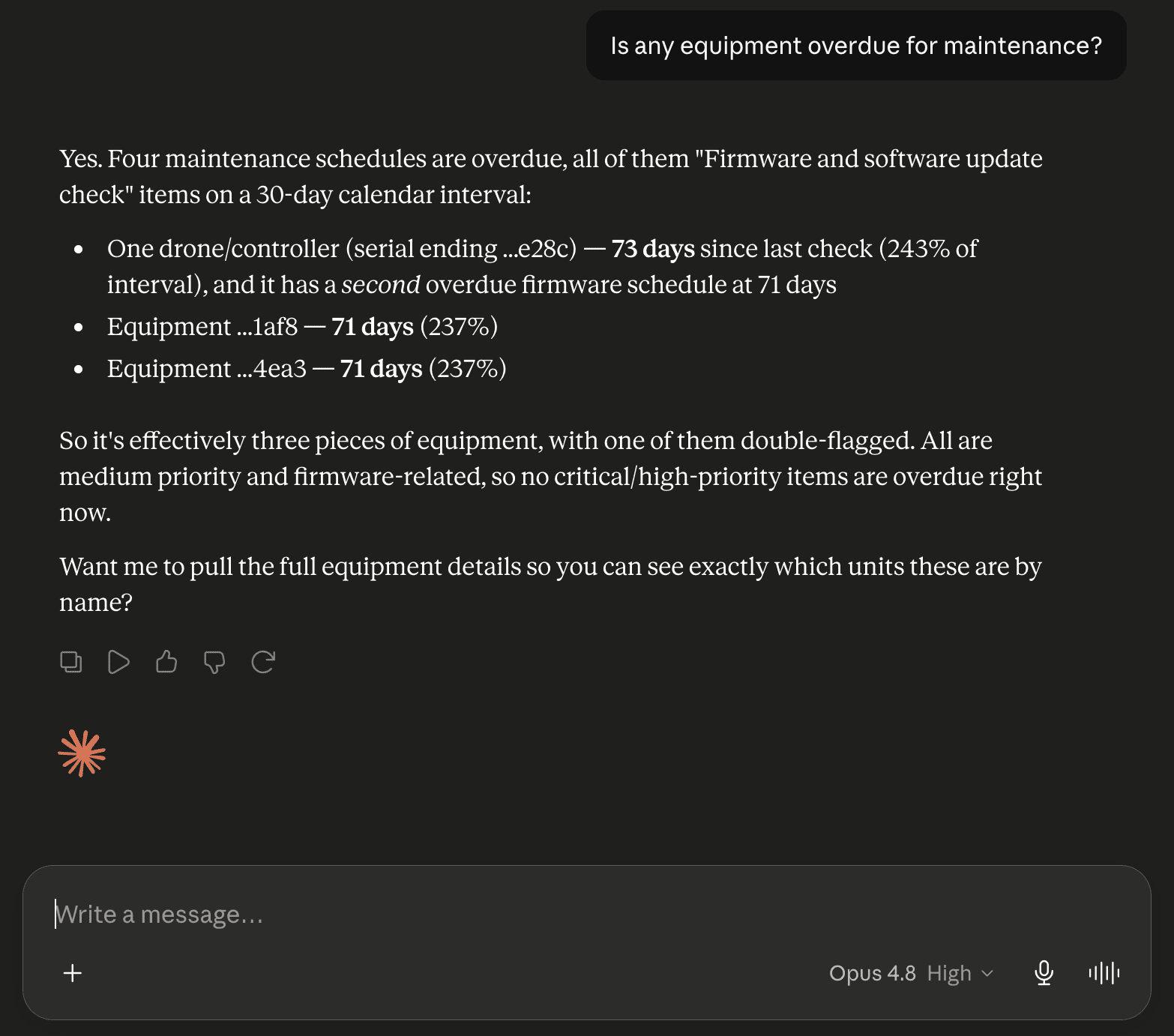
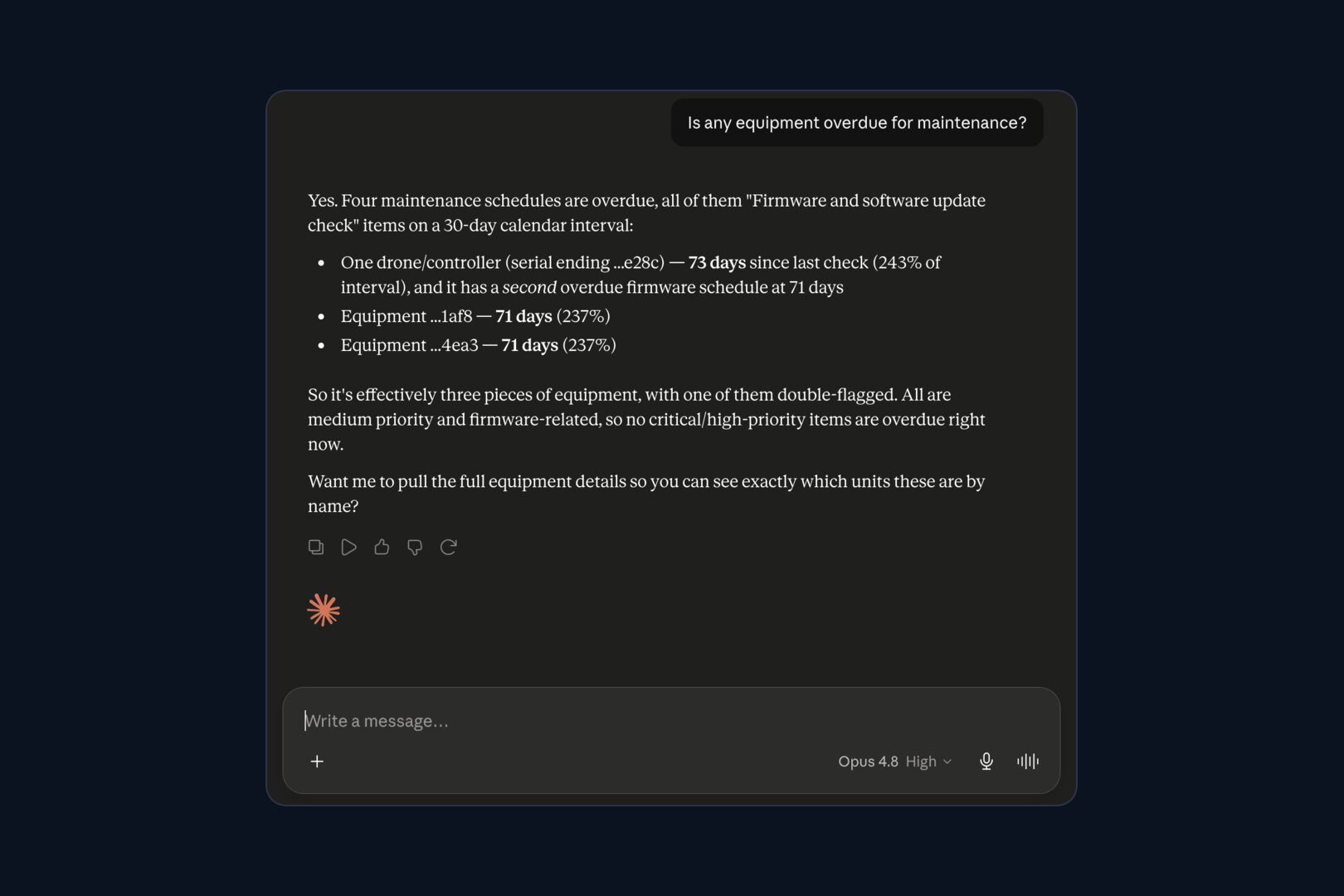
- "Is any equipment overdue for maintenance?"
- "Which drones are checked out right now, and to whom?"
- "What service is coming due in the next 30 days?"
Safety, documents and money
- "Any open incidents or overdue audits this month?"
- "Which insurance certificates or waivers expire in the next 90 days?"
- "Which client invoices are still unpaid?"
Answers come from your live workspace, so they reflect what is true now rather than last week's export. Automatic flight verification and Flight Summary feed the flight answers. Maintenance schedules and equipment check-outs feed the fleet answers. Document expiry tracking feeds the questions about certificates and policies.
This is also a fast way to pull records together when you need them. Part 107 requires the remote pilot, owner or person flying to make the documents and records the rules require available to the FAA on request, under 14 CFR 107.7. Asking for a pilot's flights and the aircraft's maintenance history in one sentence beats assembling it by hand.
DJI Dock Flights in ChatGPT and Claude
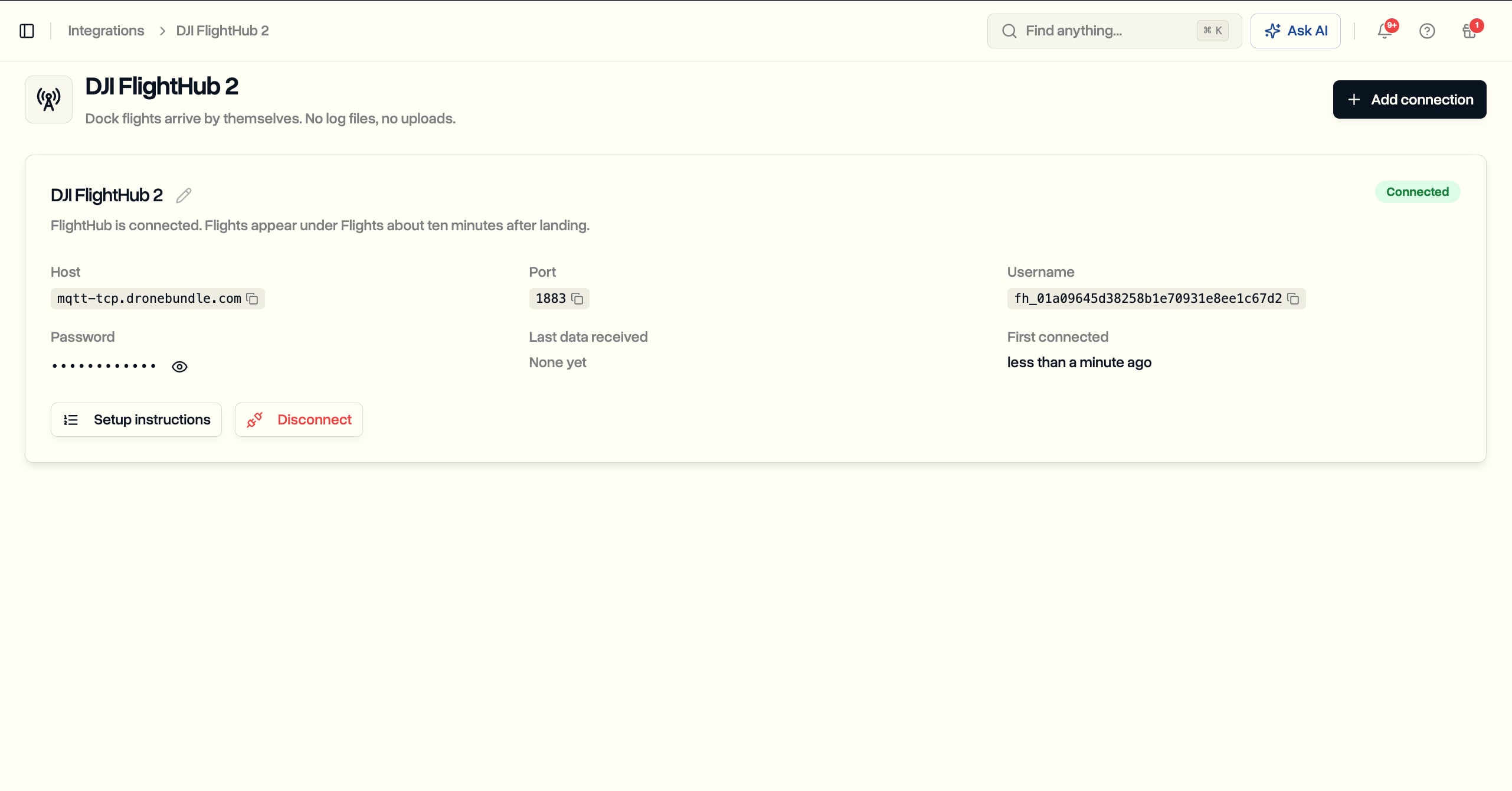
DJI Dock flights reach ChatGPT and Claude through DroneBundle. On Team and Enterprise plans, DroneBundle syncs dock flights from DJI FlightHub 2 into the same workspace as the rest of your operation, so a dock mission is a flight like any other once it lands and its log arrives.
That makes questions like these answerable from a chat window:
- "How many dock flights did the north site fly this week?"
- "Which jobs did the dock fly for this month, and for how long?"
- "Compare flight hours for our two dock drones this month."
The dock flight sync brings the records in, the FlightHub 2 integration explains how it connects, and 3D flight replay shows any of those flights after the fact. For teams running a DJI Dock 3, this means one place where dock flights, manual flights from the flight logs and the jobs they belong to can all be asked about together.
Drone MCP Servers Compared
DroneBundle is the drone MCP server built for running a drone business. The other drone MCP servers available in 2026 do different jobs: some send commands to an aircraft, some plan missions, and some sit on top of dock automation.
| Server | What the AI can reach | Built for | Setup |
|---|---|---|---|
| DroneBundle | Jobs, projects, flights, pilots, schedule, equipment, maintenance, safety, clients, invoices, documents, weather | Drone businesses and drone programs | Listed in ChatGPT; add to Claude with one address |
| Flight-control servers (open source) | One aircraft or a simulator | Developers and hobby builders | Run your own server |
| Airspace and mission planning (Dronelytics) | FAA airspace data, mission plans, Part 107 checks | Planning a single mission | Developer setup |
| Dock automation (FlytBase) | Its own dock and autonomy platform | Automated dock fleets on FlytBase | Developer setup |
1. DroneBundle: best for running the whole operation. The only server on this list that reaches clients, invoices, pilot scheduling, safety records and maintenance as well as flights. It is a hosted connection in ChatGPT's directory, so a manager can connect it without help from a developer.
2. Open-source flight-control servers. Community projects let an AI client arm, fly and read telemetry from a drone or simulator. They are experiments for developers, and you host them yourself.
3. Dronelytics. An MCP server for FAA airspace questions and mission generation, aimed at planning an individual flight.
4. FlytBase. Publishes an MCP server package for its dock automation platform, for teams already running docks on FlytBase.
If the question you want answered is about the business around the flights, such as who flew, what is due, what was billed and what is at risk, DroneBundle is the one that holds those records. For a wider view of the software itself, see the best drone management software in 2026 and the drone fleet management software guide.
Read-Only and Signed In as You
The DroneBundle MCP server only reads. A connected assistant can look things up across your workspace, but it cannot create, edit or delete anything, so no question can change your records by accident.
- It signs in as you. You connect with your own DroneBundle account, so the assistant sees exactly what your account can see and nothing more.
- Owners and project managers only. Because an assistant can look across the whole workspace, connecting is limited to the people who already have that view.
- Disconnect any time. Remove the connection in your assistant's settings and access ends straight away.
- No keys to paste. Setup is a sign-in, not a copied secret sitting in a chat window.
How to Connect ChatGPT or Claude
Connecting takes about a minute. In ChatGPT, open DroneBundle in the app directory, connect it, and sign in with your DroneBundle account. In Claude, add DroneBundle as a custom connector using the connection address from your DroneBundle settings, then sign in and approve.
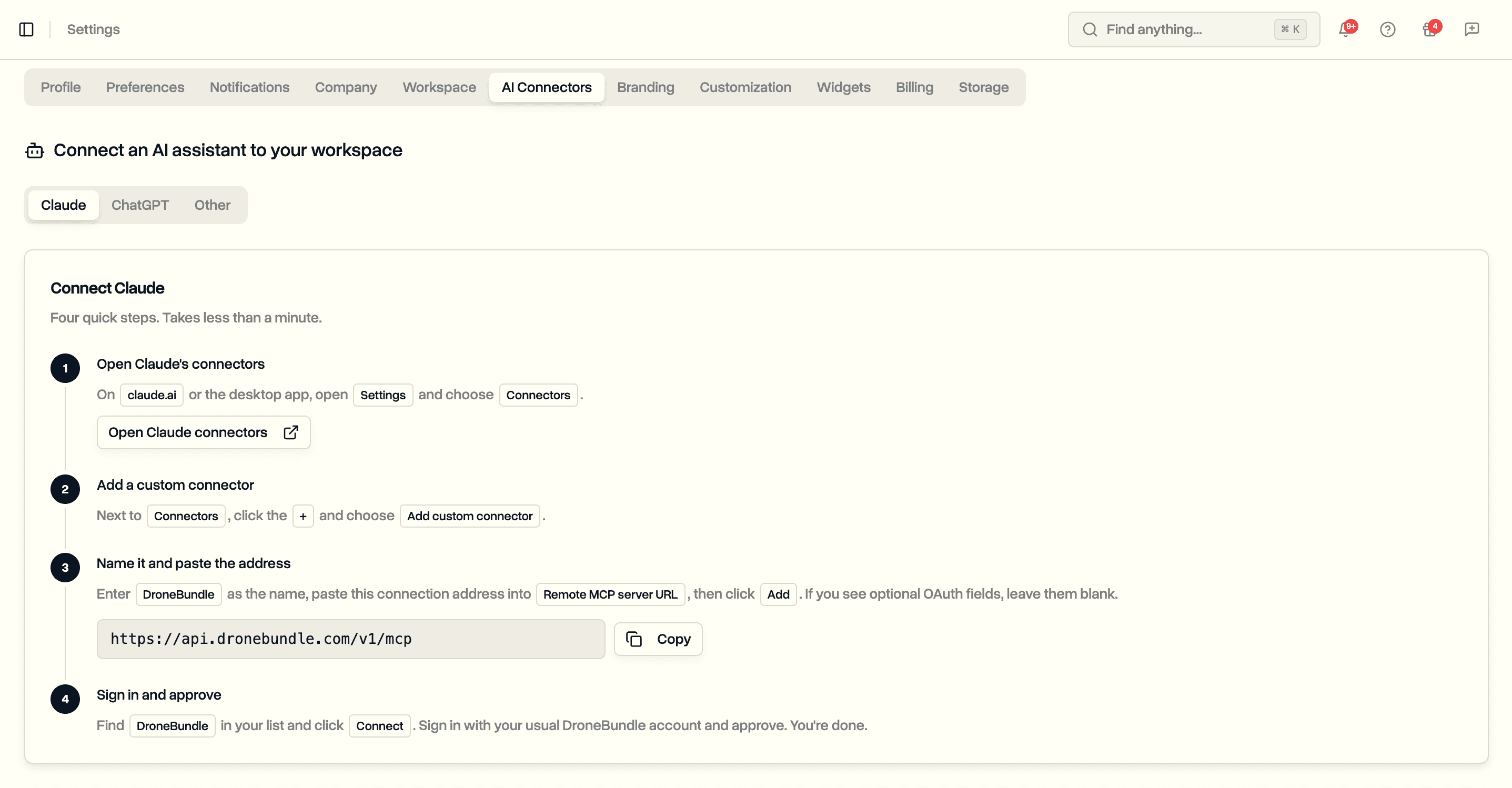
Other assistants that support MCP connectors use the same address. The AI Connectors page covers what the connection reaches, and the AI assistant guide shows the setup screens.
When to Use DroneBundle AI Instead
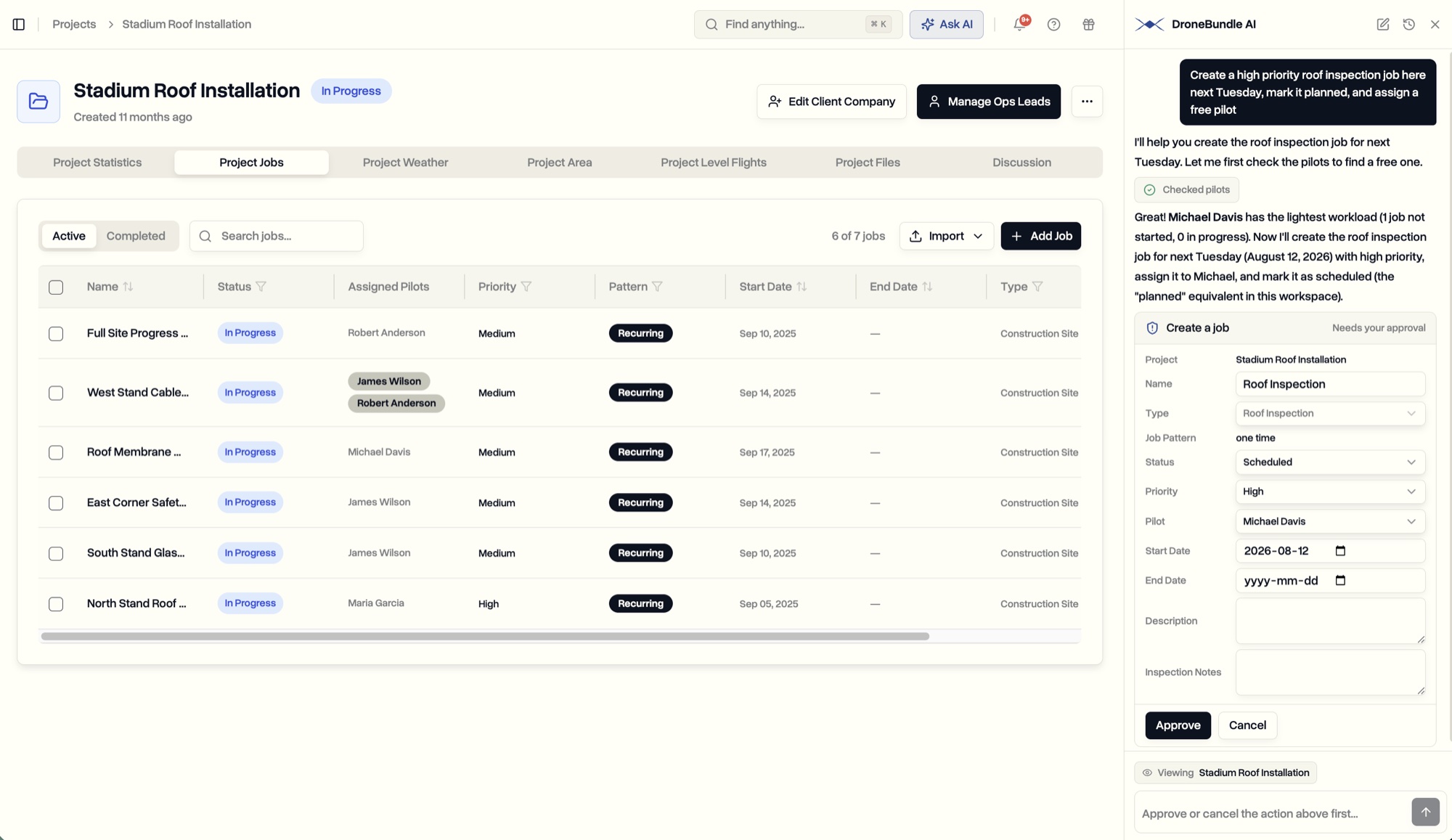
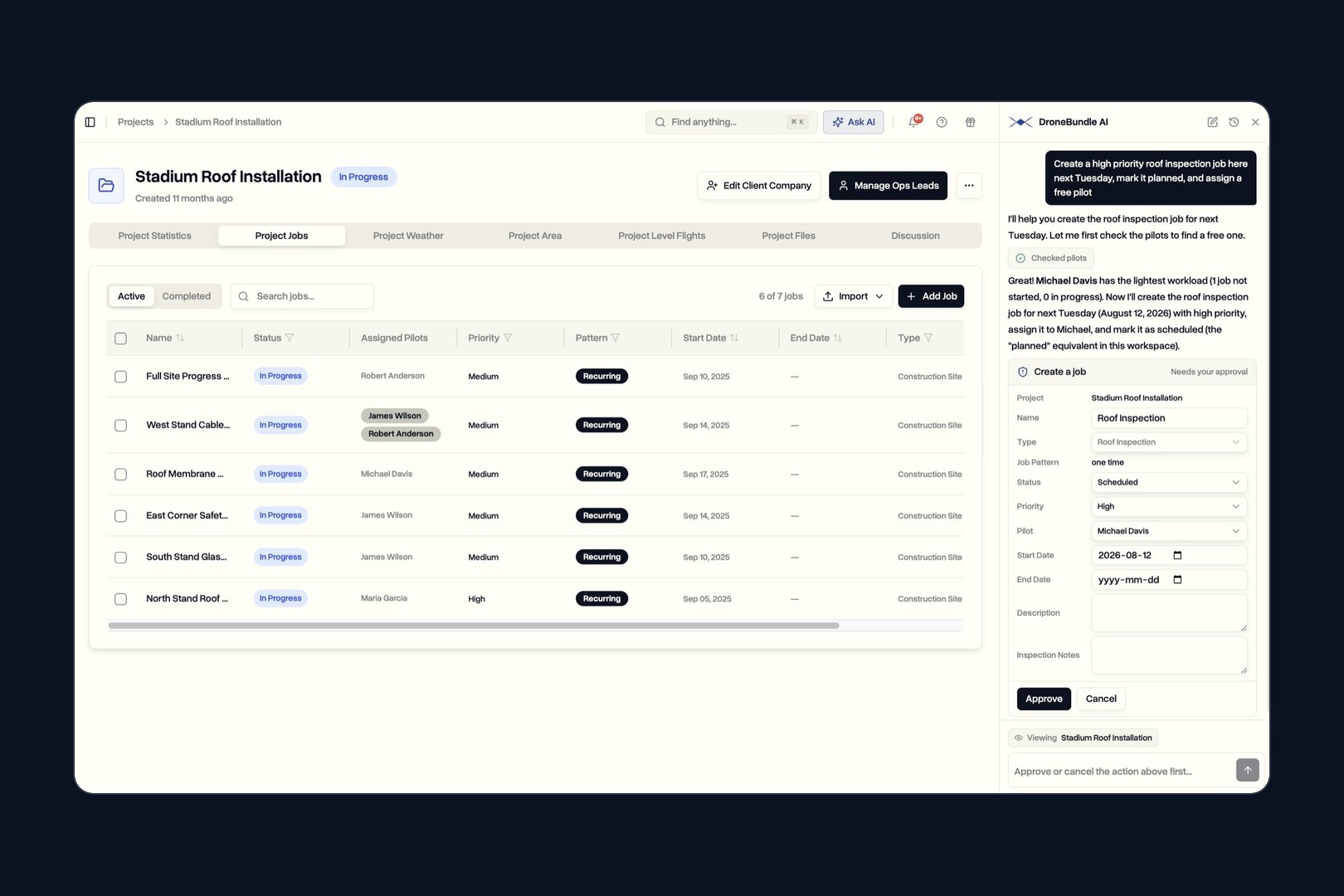
Use the MCP connection when you want answers inside the assistant you already work in. Use DroneBundle AI when you want the work done as well. It lives inside the dashboard, reads the page you have open, and proposes new jobs, pilot assignments, status changes and safety records as cards you approve.
The two work side by side. For how AI that runs the business compares with AI that flies the aircraft or reads the imagery, see AI drone software in 2026.
Frequently Asked Questions
Is there an MCP server for drone fleet management?
Yes. DroneBundle runs a hosted MCP server for drone fleet management on every plan. It lets ChatGPT, Claude and other MCP assistants read your jobs, flights, pilots, equipment, maintenance, safety records, clients and invoices, and it is listed in ChatGPT's app directory.
Can ChatGPT read my DJI flight logs?
Yes, through DroneBundle. Flight logs synced from DJI controllers, the DroneBundle Android app, uploads and DJI FlightHub 2 docks are stored as flights in your workspace, and a connected ChatGPT can answer questions about them, such as hours flown, flights per pilot or flights per job.
Can Claude change my data through DroneBundle?
No. The connection is read-only. Claude can look things up but cannot create, edit or delete anything. To have an AI create jobs or assign pilots, use DroneBundle AI inside the dashboard, where every change waits for your approval.
Does it work with assistants other than ChatGPT and Claude?
Yes. Any AI assistant that supports MCP connectors can use the same DroneBundle connection address and sign-in.
Ready to ask ChatGPT about your drone fleet?
Connect ChatGPT or Claude to your DroneBundle workspace and get answers about overdue jobs, pilot workload, flight hours and maintenance without opening a single report.
Start your free trial today. No credit card required.
Or try the live demo to see the data a connected assistant can answer from.