What is the DJI Dock 3?
The DJI Dock 3 is DJI's drone-in-a-box station for the Matrice 4D and Matrice 4TD. It launches, lands and recharges the aircraft with nobody on site, charging from 15% to 95% in about 27 minutes, and it is rated IP56 and -30°C to 50°C. It is the first DJI dock that can be mounted on a vehicle. US dealers listed the dock alone at $15,799 to $15,890 in September 2026, and ready-to-fly kits with an aircraft run about $23,400 to $26,400.
The DJI Dock 3 is a weatherproof box that houses a drone, opens on a schedule or a command, sends the aircraft out on a mission, and brings it back to charge. DJI released it on February 27, 2025, as the successor to the Dock 2, and it pairs only with the Matrice 4D series.
Buying one is the easy part. A dock turns a drone into a piece of site infrastructure, and that brings questions a handheld drone never raised: where it gets power and network, who is legally flying it at 3 a.m., what permission covers flights nobody can see, and where hundreds of automated flight records end up.
This guide covers the specs and real prices, how the Dock 3 compares with the Dock 2, and then the part that decides whether a dock program works: running one.
Table of contents
- DJI Dock 3 specs
- The drone inside: Matrice 4D and 4TD
- DJI Dock 3 price and full kit cost
- DJI Dock 2 vs Dock 3
- Buying a Dock 3 in the US in 2026
- FlightHub 2: the software the dock runs on
- Site, power and network requirements
- Permission to fly a dock
- Running a Dock 3 day to day
- Where the flight records go
- Frequently asked questions
DJI Dock 3 specs
The DJI Dock 3 weighs 55 kg without the aircraft, runs on 100 to 240 V AC with a maximum draw of 800 W, and is rated IP56 for dust and water. The figures below come from DJI's official Dock 3 specifications and the Dock 3 FAQ.
| Spec | DJI Dock 3 |
|---|---|
| Weight | 55 kg (without aircraft) |
| Size, closed | 640 × 745 × 770 mm |
| Size, open | 1,760 × 745 × 485 mm |
| Power | 100 to 240 V AC, 50/60 Hz, max 800 W |
| Ingress protection | IP56 |
| Operating temperature | -30°C to 50°C (lowest figure requires pre-heating) |
| Max wind for landing | 12 m/s |
| Max rainfall (per DJI FAQ) | 2 mm/h |
| Max site altitude | 4,500 m |
| Charging | 15% to 95% in 27 minutes at 25°C; about 37 minutes to 100% |
| Backup battery | 12 Ah lead-acid, more than 4 hours |
| Network | Gigabit Ethernet port; 4G through the DJI Cellular Dongle 2, sold separately |
| Dock cameras | 1080p inside and outside, both 151° field of view |
| Built-in sensors | Wind, rainfall, ambient temperature, water immersion, cabin temperature and humidity |
| Aircraft supported | Matrice 4D and Matrice 4TD only |
Three details on that sheet shape how a dock is used in practice.
The rain limit is low. IP56 keeps water out of the box, but DJI's FAQ caps operations at 2 mm of rain per hour. That is light rain. A dock rated to survive a storm will still sit out a steady downpour, which matters if a client expects a patrol every night.
One aircraft can use several docks. DJI supports multi-dock tasks, where one drone takes off from one Dock 3 and lands at another. It does not support several drones sharing one dock. Corridor work, such as a pipeline or a long fence line, can chain docks together.
It can ride on a truck. Dock 3 is DJI's first dock designed for vehicle mounting, and two docks can go on one vehicle. DJI's FAQ says the parking slope must be under 3° during operation, so the vehicle is parked while the dock flies. A drone can also act as a relay for a second drone, extending range where terrain blocks the signal and there is no 4G.
The drone inside: Matrice 4D and 4TD
The Dock 3 only works with the Matrice 4D series: the Matrice 4D for visual and mapping work, and the Matrice 4TD, which adds a 640 × 512 radiometric thermal camera. Both weigh 1,850 g, are rated IP55, and DJI quotes 54 minutes of forward flight and 47 minutes of hover.
The two share a 48 MP medium telephoto and a 48 MP 168 mm telephoto camera. The 4D's wide camera is a 20 MP 4/3-inch sensor with a mechanical shutter, which suits mapping. The 4TD swaps that for a 48 MP wide camera, and adds the thermal sensor, a 1,800 m laser rangefinder and a near-infrared light, which is why it is the common choice for security patrols and public safety.
The operating radius from the dock is 10 km, and the aircraft works from -20°C to 50°C. Both aircraft carry EASA C2 and C6 class labels, which matters for European permissions below.
The 4TD is the docked, weatherproof sibling of the handheld Matrice 4T. For the sensor details and the thermal side, the DJI Matrice 4T guide covers the shared camera core. If you are weighing thermal against visual for a site, the thermal drone buyer's guide goes further.
DJI Dock 3 price and full kit cost
The DJI Dock 3 on its own was listed at $15,799 to $15,890 at most US dealers on September 29, 2026. One dealer listed it at $12,999. A complete kit with an aircraft ran from about $23,400 to $26,400, and the software plan, spare batteries and installation come on top.
Prices below were checked on the websites of Dronefly, DSLRPros, Advexure, DroneNerds, Maverick Drone and Volatus Drones.
| Item | US listed price, September 2026 |
|---|---|
| DJI Dock 3, dock only | $15,799 to $15,890 (one outlier at $12,999) |
| Matrice 4D for Dock 3, aircraft only | $5,300 to $5,550 |
| Matrice 4TD for Dock 3, aircraft only | $7,599 to $7,640 |
| Dock 3 + Matrice 4D ready-to-fly kit | $24,272 |
| Dock 3 + Matrice 4TD kit | $23,418 to $26,412, depending on dealer and included DJI Care |
| Spare Matrice 4D series battery | $420 to $459 |
| D-RTK 3 Relay, fixed deployment | $2,799 to $3,333 |
| Vehicle-mounted gimbal mount | $459 to $473 |
| FlightHub 2 Enterprise, 12 months, 1 device | $3,280 (DSLRPros listing) |
| Installation, electrical work, network, mounting | Quoted per site |
Two cautions on those numbers.
First, installation is a real line item. A dock needs a mounting surface, a power run, a network connection and often a site survey. Dealers quote this per site, and a rooftop with no nearby power costs very differently from a pad next to an existing equipment room.
Second, the listings may not survive the next shipment. Since September 3, 2026, new US imports of drone docking stations and thermal drones carry a 100% tariff under an August 13, 2026 presidential proclamation. The Dock 3 is caught as a docking station, and the Matrice 4TD as a thermal drone. Listings in late September may reflect stock imported before that date, so ask the dealer whether a quote is for existing stock.
DJI Dock 2 vs Dock 3
The DJI Dock 3 is heavier than the Dock 2 but handles colder weather, stronger wind at landing and vehicle mounting, and it charges faster. It carries a different aircraft: the Dock 2 uses the Matrice 3D and 3TD, and those aircraft do not work in a Dock 3.
| DJI Dock 2 | DJI Dock 3 | |
|---|---|---|
| Aircraft | Matrice 3D / 3TD | Matrice 4D / 4TD |
| Dock weight | 34 kg | 55 kg |
| Size, closed | 570 × 583 × 465 mm | 640 × 745 × 770 mm |
| Dock ingress rating | IP55 | IP56 |
| Operating temperature | -25°C to 45°C | -30°C to 50°C |
| Max wind for landing | 8 m/s | 12 m/s |
| Charging | 32 min, 20% to 90% | 27 min, 15% to 95% |
| Max power draw | 1,000 W | 800 W |
| Max site altitude | 4,000 m | 4,500 m |
| Backup battery runtime | More than 5 hours | More than 4 hours |
| Aircraft flight time | 50 min | 54 min |
| Aircraft ingress rating | IP54 | IP55 |
| Vehicle mounting | No | Yes |
Figures come from DJI's published specifications for each dock.
The landing wind figure is the one that shows up in the flight log. A dock that can only land in 8 m/s cancels more missions on a windy coast or an exposed roof than one rated for 12 m/s, and every cancelled mission is a gap in the service a client is paying for.
If you already run Dock 2 sites, there is no rush to replace them for the specs alone. DJI's FlightHub 2 manages Dock 2 and Dock 3 side by side. Upgrading means buying both a new dock and a new aircraft, and a few dealers now mark Dock 2 bundles as discontinued, so plan spares for a Dock 2 fleet while they are still easy to find.
Buying a Dock 3 in the US in 2026
As of late September 2026, you can still buy and fly a DJI Dock 3 in the US. The dock and the Matrice 4D series went on sale before the FCC added foreign-produced drones and components to its Covered List in December 2025, and that listing blocks only new equipment authorizations. Our DJI ban explainer covers the background.
The risk is a pending proposal. In July 2026 the FCC opened PS Docket 26-189, published in the Federal Register on August 3, 2026, which would stop the continued importation and marketing of already-authorized Covered List drones that meet any of seven "military-grade" definitions. Two of those definitions are UAS docking stations and drones with thermal imaging sensors.
A Dock 3 with a Matrice 4TD meets two triggers at once. A Dock 3 with a non-thermal Matrice 4D still meets one, because the dock itself is named.
What the proposal says about equipment you already own:
- Use continues. The notice says the prohibition would not affect the continued use of already-purchased UAS.
- Sales would stop. Importing and marketing would have to cease 180 days after a final decision is published.
- Comments closed September 2, 2026. Of roughly 3,800 readable filings, about 3,770 opposed the proposal as written, according to a count by Pilot Institute reported by DroneXL. No final decision had been published as of September 29, 2026.
For a dock program the practical issue is not the dock you buy this year. It is the second and third site next year, the replacement aircraft after a crash, and the batteries a busy dock burns through. The notice does not spell out which spare parts would count as covered components. The US foreign drone ban analysis and the Matrice 4T guide above walk through how to buy under that uncertainty.
This is general information, not legal advice.
FlightHub 2: the software the dock runs on
A DJI Dock 3 is planned, launched and monitored through DJI FlightHub 2, DJI's cloud platform for enterprise fleets. It is where you draw routes, set schedules, watch live video and take manual control through the virtual cockpit. A few third-party dock platforms, such as FlytBase, also work with DJI docks.
FlightHub 2 comes in Standard (free), Business and Enterprise tiers. DSLRPros lists the Enterprise version at $3,280 for 12 months on one device, with livestream top-up packages sold separately. The Enterprise tier is also what you need to forward flight data out of FlightHub to another system. DJI released an on-premises version in June 2025 for organizations that cannot keep data in DJI's cloud. Our DJI FlightHub 2 breakdown covers tiers, limits and what the platform does not do.
One gap matters for US operators. DJI stopped flight record syncing to its servers for US users, and DJI's own Dock 3 launch announcement repeats that. Flights still happen and show in FlightHub, but getting a clean flight log out for your own records takes a different route, covered in the records section below.
Site, power and network requirements
A Dock 3 site needs an open patch of sky, stable AC power, a reliable internet connection and a surface that can carry 55 kg plus the aircraft. DJI's FAQ asks for an open environment with stable power and internet, at no more than 4,500 m altitude.
A site checklist worth working through before the dealer arrives:
- Clearance. The dock is 640 × 745 mm closed but 1,760 mm long when open. Leave room for the covers, and for a technician to stand beside it safely, especially on a roof.
- Sky and obstacles. The aircraft climbs out and lands vertically over the dock. Trees, masts, light poles and overhanging structures near the pad raise the risk on every landing.
- Signal survey. DJI's FAQ lists the Matrice 4D series and Matrice 4 series as aircraft for site evaluation. Fly the planned routes by hand first and check signal strength and GNSS reception at the far end of each one. Where terrain blocks the link, the D-RTK 3 Relay is an optional ground relay, and DJI recommends placing it within 1 km of the dock.
- Power. 100 to 240 V AC and up to 800 W. The lead-acid backup battery keeps the dock running for more than four hours in an outage so the aircraft can come home and land, but per DJI's FAQ it cannot charge the aircraft. A long power cut grounds the site.
- Network. Wired Ethernet is the dependable choice. 4G works through the DJI Cellular Dongle 2, sold separately. Live video is the heaviest load, so test upload speed at the exact install spot, not in the site office.
- Grounding and surge protection. A metal box on a roof or a mast base needs proper earthing. Have a licensed electrician sign off the install.
- Access and security. Someone will need to reach the dock to clean it and swap parts. Someone else will be curious about it. Fence it or put it where the public cannot reach it.
- Privacy. The dock's outside camera and every patrol flight record the surroundings. If neighbours, workers or public roads are in view, decide who can see the footage and how long you keep it.
Vehicle-mounted docks swap the roof for a truck, but the FAA rule on moving vehicles still applies. Under 14 CFR 107.25 you cannot operate from a moving vehicle except over sparsely populated areas, which lines up with DJI's requirement that the vehicle is parked on a slope under 3° while the dock operates.
Permission to fly a dock
In the US, most Dock 3 programs need an FAA waiver or approval to fly beyond visual line of sight, because Part 107 requires the remote pilot or a visual observer to see the aircraft for the whole flight. In Europe, dock operations fall in the specific category and need an operational authorisation from the national aviation authority.
In the United States. Without a waiver, somebody must keep the aircraft in sight (§107.31), and a visual observer must stay in contact with the remote pilot (§107.33). That defeats the point of a dock at most sites. Three Part 107 rules come up again and again for dock work, and all three appear in the list of waivable Part 107 regulations in §107.205:
- §107.31, visual line of sight. The core BVLOS waiver. Our BVLOS waiver guide covers what the FAA looks for.
- §107.33, visual observer. Relevant when your concept uses observers or relies on technology instead of them.
- §107.35, multiple aircraft. One person may not act as remote pilot for more than one aircraft at the same time. A single remote pilot supervising three docks that fly at once needs this waived too.
Two other routes exist. The FAA's Section 927 waiver process, published April 1, 2026, offers another path to approve operations Part 107 does not cover. Public safety agencies can fly under the Part 91.113 public safety waiver that replaced the old COAs in April 2025, which can include BVLOS and is how many drone-as-first-responder programs launch. The drones for first responders guide covers eligibility, and the public safety industry page shows how agencies keep the records.
Part 108 is still a proposal. The FAA's BVLOS rule was proposed in August 2025, and the draft final rule has been under White House review since July 10, 2026. No final rule had been published as of September 29, 2026. The Part 108 NPRM tracker follows its status. One detail matters for docks: the proposal replaces the individual remote pilot with an operations supervisor and flight coordinators, and proposed §108.210 sets a ratio of one aircraft per flight coordinator unless the operator shows the FAA an acceptable method for more. Even under Part 108, one person watching many docks will not be automatic.
In EASA member states. A dock flying remote missions falls in the specific category. The STS-02 standard scenario allows BVLOS with a C6-labelled aircraft, but only up to 1 km from the remote pilot without airspace observers, 2 km with them, over a controlled ground area in a sparsely populated environment. A pilot sitting in an operations center far from the site cannot use it, so most remote dock programs apply through a SORA risk assessment instead. In July 2026 DJI published a SAIL III declaration of compliance package for the Dock 3 and Matrice 4D series, which operators can attach to a SORA application as manufacturer evidence for eight design-related safety objectives. The operator still writes and owns the application. See EASA's civil drone pages, and our guide to the SORA process.
Running a Dock 3 day to day
A dock removes the drive to site, not the people. Every mission still needs a responsible remote pilot, a schedule, weather decisions, maintenance and someone to act on what the drone finds.
Scheduled missions. Routes and schedules are set in FlightHub 2: a nightly perimeter patrol, a weekly stockpile survey, a thermal pass over a substation at dawn. The dock checks its own wind and rain sensors before launch. Plan each schedule around the 12 m/s wind and 2 mm/h rain limits, and decide in advance what happens to a missed flight: does it re-fly later that day, or is it logged as a weather cancellation the client accepts?
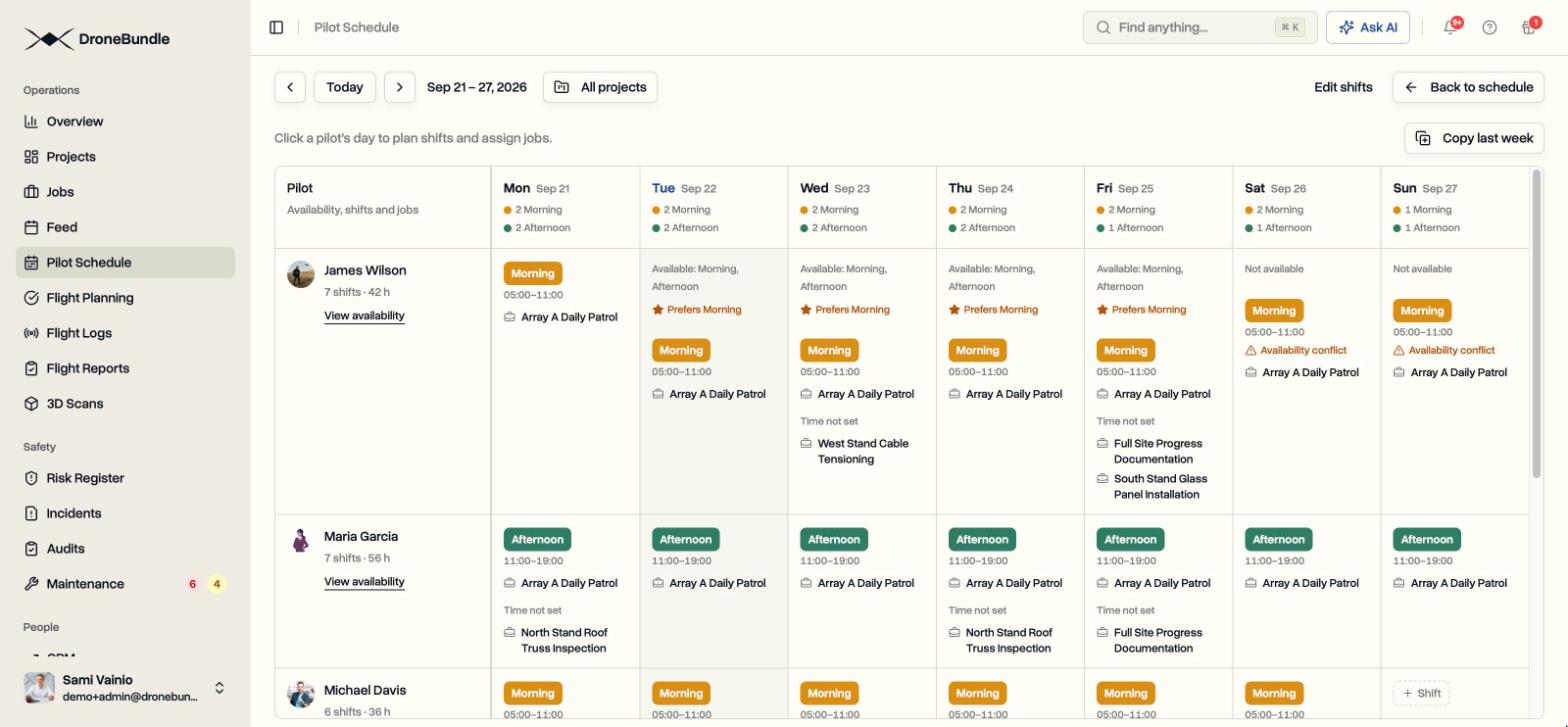
A remote pilot on duty. Under Part 107 there is always a remote pilot in command with final authority for the flight, even when the drone flies itself. That person must be reachable and ready to take control for every scheduled mission. The arithmetic of coverage is blunt: a single seat staffed 24 hours a day, 7 days a week is 168 hours, or more than four full-time people at 40 hours each, before holidays and sick days. Shift rosters, handovers and qualification checks become daily work. The pilot schedule guide covers how to plan shifts against a flight calendar.
Batteries are the fastest-wearing part. The Matrice 4D series battery is rated for 400 cycles. If a dock flies six missions a day and each is roughly one charge cycle, that is about 2,190 cycles a year, or five to six batteries at $420 to $459 each. Track cycle counts per serial number in a drone maintenance log rather than finding out when the dock refuses to launch.
Physical upkeep. Somebody has to visit. Clean the dock cameras and the landing area, check propellers for chips, clear leaves, snow and insects, and inspect seals after storms. Plan these visits on a fixed interval rather than waiting for a fault. The drone maintenance guide covers how to set flight-hour intervals.
Firmware. The dock, the aircraft and FlightHub 2 all update. Update one site first, confirm it flies normally, then roll out, and record which version each site runs. If an incident happens, the version is one of the first questions.
Insurance. A $24,000 kit bolted to a roof is a different hull risk from a drone in a case, and automated BVLOS flights are a different liability risk from a pilot on site. Confirm your policy covers flights under your waiver with nobody on site. The drone insurance guide lists the terms to check.
Turning footage into a service. For a security client, a patrol is only useful if someone reviews the footage and acts on it. The drone security system guide covers how alarm response and patrol review fit together, and the drone as a service guide covers how dock contracts, SLAs and weather exclusions are written when you run docks for clients.
Where the flight records go
Every Dock 3 flight creates a record in FlightHub 2, but FlightHub is a flight operations platform, not the system that runs a client business. The records you need for regulators, clients and maintenance usually have to live somewhere else too.
Part 107 requires you to produce required records to the FAA on request, and waiver conditions can add reporting requirements of their own. In Europe, an operational authorisation comes with record-keeping obligations. A dock flying several times a day generates hundreds of flight records a month, and each one still has to be matched to a client, a site, a pilot and an aircraft. With DJI's flight record sync unavailable in the US, exporting them by hand is not a realistic habit.
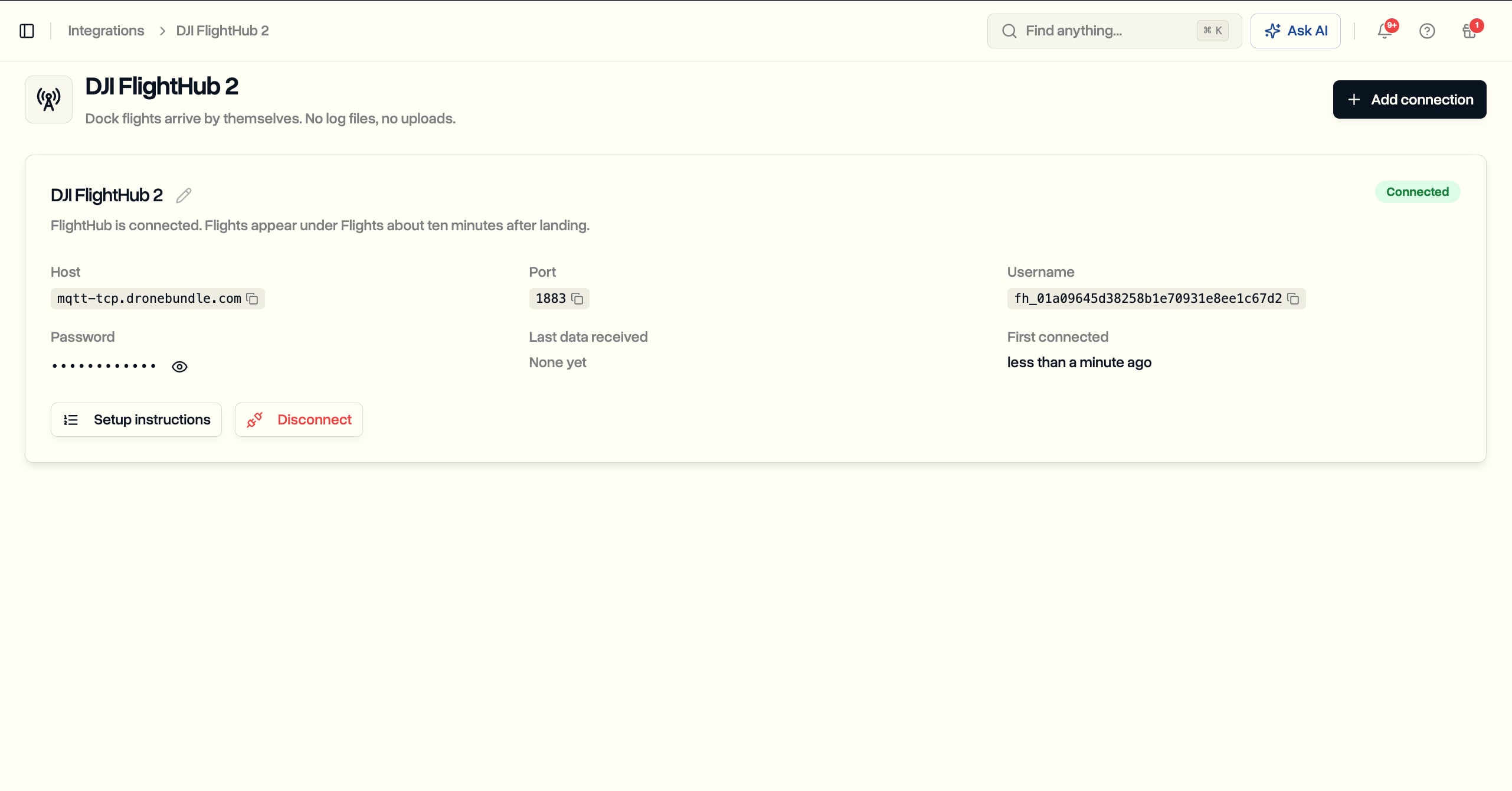
DroneBundle connects to DJI FlightHub 2 once, through FlightHub's own forwarding feature, which also works for US operators. From then on, every dock flight arrives on its own, about ten minutes after landing, with no log files or uploads. Each flight files itself under the right client job: first by the job the dock is attached to, then by matching the flight path to the areas drawn on your jobs, and otherwise it waits as unlinked with a notification.
From there the rest of the business runs on the same record:
- Schedule and pilot credit. If a scheduled flight in the Pilot Schedule covers the takeoff time, it is marked Completed, and the flight is credited to the pilot rostered on it.
- Maintenance. The first flight registers the dock, aircraft and batteries as equipment, and every flight adds to flight hours on the aircraft and cycle counts on each battery.
- Client reporting. Flight reports build from the flight records, and clients see what you publish through the client portal.
- Invoicing. Recurring patrol and monitoring work is invoiced next to the flights that prove it happened.
DroneBundle does not fly the dock. FlightHub plans and flies the missions, and DroneBundle runs everything around them. The dock operations page shows how that works across several docks and sites.
Frequently asked questions
How much does a DJI Dock 3 cost?
US dealers listed the DJI Dock 3 alone at $15,799 to $15,890 in September 2026, with one outlier at $12,999. Kits with a Matrice 4D or 4TD ran about $23,400 to $26,400. Add a FlightHub 2 plan (the Enterprise tier is listed at $3,280 per device per year), spare batteries and site installation. New imports have carried a 100% tariff since September 3, 2026, so future prices may be higher.
Can the DJI Dock 3 operate in rain?
The dock is rated IP56 and the Matrice 4D series aircraft IP55, so both handle wet conditions. DJI's FAQ still limits operations to a maximum rainfall of 2 mm per hour and wind of 12 m/s. In heavier rain the dock stays closed and missions wait.
Which drone works with the DJI Dock 3?
Only the Matrice 4D and Matrice 4TD. The Matrice 3D and 3TD from the Dock 2 do not fit, and the handheld Matrice 4T and 4E cannot use the dock. One aircraft can work across several Dock 3 units, but each dock houses one aircraft.
Do you need a waiver to fly a DJI Dock 3 in the US?
Usually, yes. Part 107 requires the remote pilot or a visual observer to see the aircraft throughout the flight, so remote dock operations need a waiver of §107.31 or another FAA approval, and a waiver of §107.35 if one pilot supervises several aircraft at once. Public safety agencies can use the Part 91.113 public safety waiver. Part 108, the proposed BVLOS rule, was not final as of September 2026.
Ready to run your Dock 3 flights as a business?
The dock and FlightHub handle the flying. What is left is the part clients pay for: every automated flight filed under the right job, pilot shifts that cover every mission, maintenance counters that move with each landing, and reports and invoices built from the flights themselves.
See how DroneBundle handles that on the dock operations page, or book a live demo and we will walk through dock flights arriving in a workspace, filed to jobs, pilots and maintenance.