Ask DroneBundle AI about your work
Ask questions about your projects, jobs, pilots and flights in plain words, and have it create jobs, assign pilots or update statuses after you approve each change.
DroneBundle AI reads your workspace, so you can ask it things you'd otherwise click through several pages to find. It only sees what you're allowed to see.
Ask a question
- Click Ask AI at the top of the dashboard, or press ⌘J on a Mac or Ctrl+J on Windows.
- Type your question and press Enter.
It knows which page you're on, so "what's left on this project?" works from a project page. Each page also suggests a few questions to start with.
Things to ask:
- "Which jobs this week have no pilot yet?"
- "How many hours did each pilot fly last month?"
- "What documents expire in the next 90 days?"
- "Summarize what happened on the Riverside project this week."
- "Which flights are still waiting for approval?"
Ask how to do something
Ask how something works in DroneBundle, like "How do I share a project with a client?" or "Where do I add my logo?". It reads the matching article in this Help Center and gives you the steps. A Read more card under the answer opens the full article.
Have it make changes
It can also do the work: create a project or a job, assign pilots, change a project's or job's status, update details, post in a project discussion, record or review a flight report, email a project export, or add a risk or an incident.
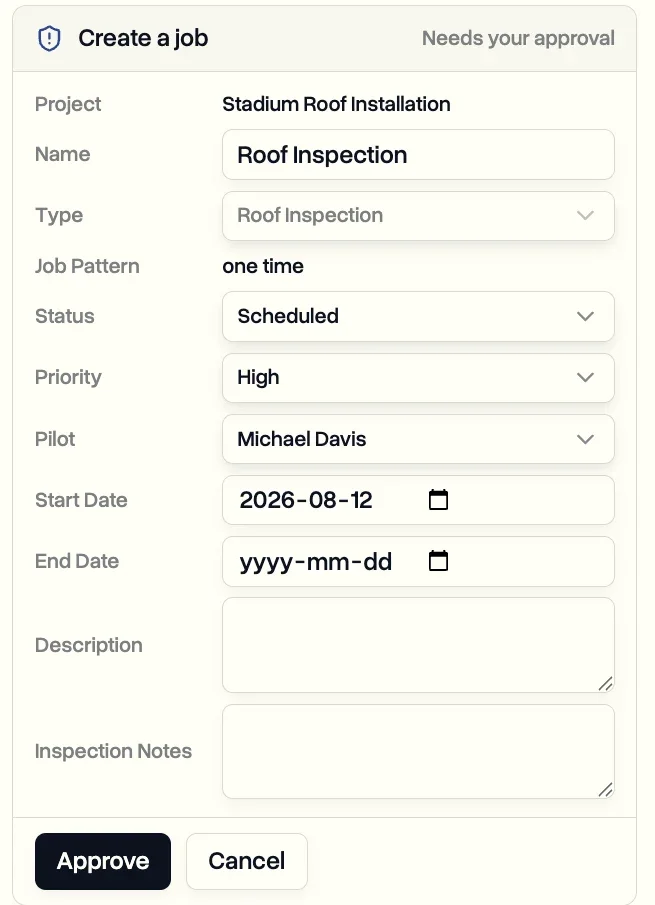
It never changes anything on its own. Each change shows up as a card marked Needs your approval, with exactly what it will do. Click Approve to go ahead or Cancel to drop it. You can change the details on the card first.
Your conversations
- Click New chat to start fresh.
- Conversation history lists your earlier chats, so you can pick one up again or delete it.
- Conversations are private to you.
Prefer to ask from somewhere else? The same AI answers in Slack, and you can connect ChatGPT or Claude to your workspace. See Connect Slack and Ask ChatGPT or Claude about your workspace.
Last updated Nov 18, 2026
Did this answer your question?
Still stuck?
Ask DroneBundle AI in the app, or email us and a person will answer.