
Every drone you fly, in one flight record.
DroneBundle supports every DJI drone and DJI Dock, any PX4 or ArduPilot aircraft such as Freefly, Teal, Wingtra and Inspired Flight, the Autel EVO series and the Parrot ANAFI family. Every flight lands in one record with 3D replay, battery health, equipment records and maintenance counters.

Every drone and log format DroneBundle reads
DroneBundle reads flight logs from every DJI drone and DJI Dock, any PX4 or ArduPilot aircraft, Autel and Parrot. One workspace holds the whole fleet, whichever maker built each drone, and flight logs from every brand work on every plan.
| Brand | Aircraft | Log files | How flights get in |
|---|---|---|---|
| DJI | AircraftEvery DJI drone flown with DJI Fly, DJI Pilot 2 or DJI GO 4, including the Matrice 4 series, Matrice 350 RTK, Matrice 300 RTK, Matrice 30, Mavic 3 Enterprise, Mavic 3, Air 3, the Mini series, Avata 2 and Phantom 4 | Log filesFlight records (.txt), up to 50 MB each | How flights get inUploaded on their own by the DroneBundle Controller App on DJI controllers such as the RC Plus 2 and RC Pro, or uploaded from a phone or computer. |
| DJI Docks | AircraftDJI Docks and the drones they fly, including DJI Dock 3 with the Matrice 4D and 4TD, run in DJI FlightHub 2 | Log filesDock flights from DJI FlightHub 2 | How flights get inConnect FlightHub 2 once. Each dock flight arrives about ten minutes after landing. Team and Enterprise plans. |
| PX4 | AircraftAny PX4 aircraft, including the Freefly Astro and Alta X, Teal 2, WingtraOne and WingtraRAY | Log files.ulg logs, up to 300 MB each | How flights get inUploaded from the SD card, or after downloading the log with QGroundControl. |
| ArduPilot | AircraftAny ArduPilot aircraft, including the Inspired Flight IF800 and IF1200 and custom builds | Log files.bin and .tlog logs, up to 300 MB each | How flights get inUploaded from the SD card or Mission Planner. A .tlog holding a day of flying is split into separate flights. |
| Autel | AircraftThe EVO II and EVO Max series, flown with Autel Explorer or Autel Enterprise | Log filesFlight records from Autel Explorer and Autel Enterprise, up to 50 MB each | How flights get inUploaded from the FlightLog folder on the phone, tablet or Smart Controller. |
| Parrot | AircraftThe ANAFI family, including ANAFI USA, ANAFI Thermal and ANAFI UA | Log filesFlight logs exported from FreeFlight 6 (.json), up to 50 MB each | How flights get inExported from FreeFlight 6, then uploaded. |
Want to look at one log first? Open it in the free flight log viewer, no account needed.
In early access
These are rolling out to early access teams first. Request access and we will set it up with you.
Skydio flight logs
Skydio X10 and Skydio 2+ flights in the same record as the rest of your fleet, with replay, equipment records and maintenance counters.

Live flight tracking
Every drone on the map while it flies, next to its job, its pilot and the airspace around it.

LAANC requests
LAANC authorizations requested from the job through an FAA-approved LAANC provider, with the answer filed on the project.
What DroneBundle reads from each flight log

The flight
- Path and numbers
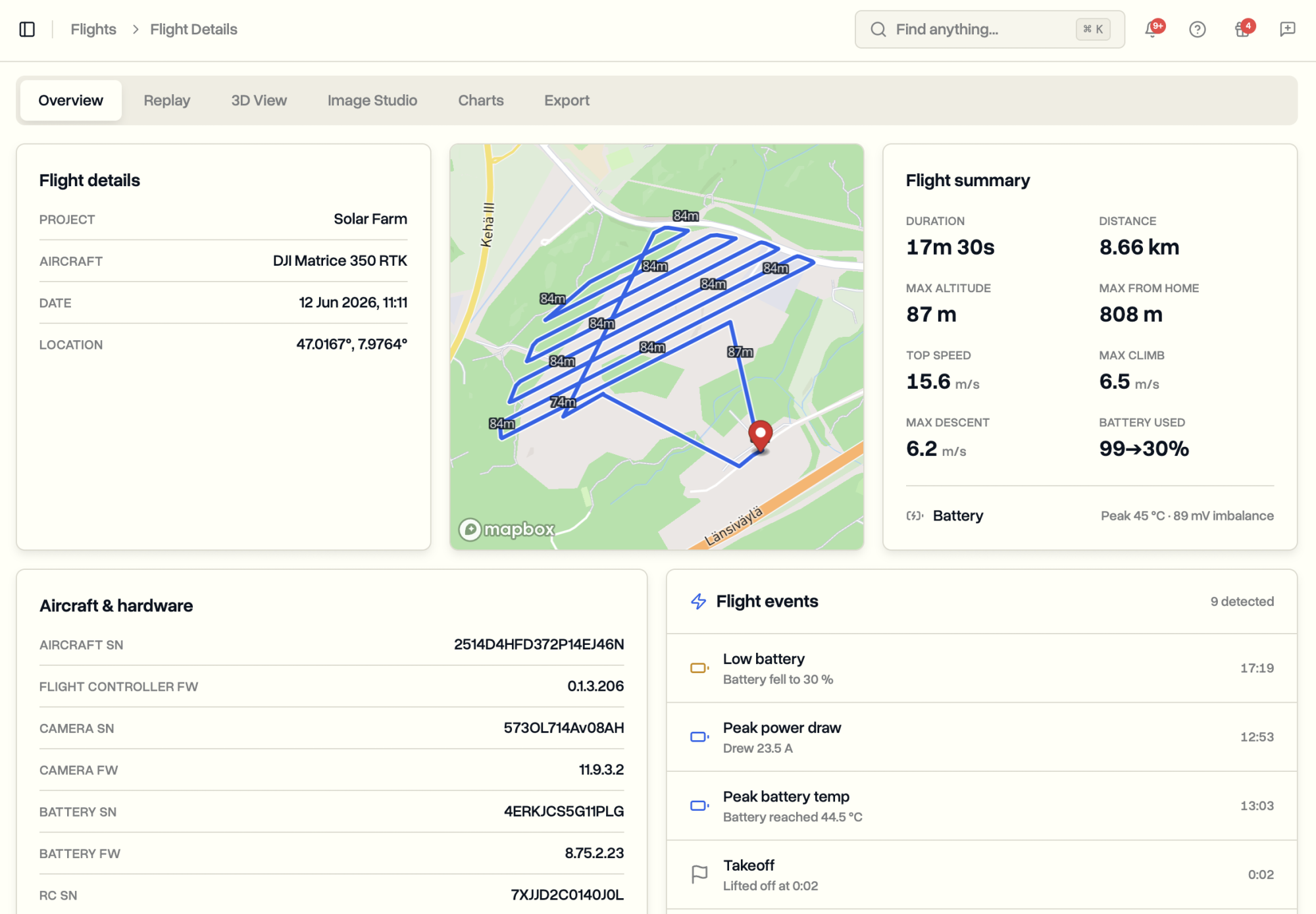
- The flight path on the map, duration, distance, highest altitude, furthest distance from home, top speed, climb and descent.
- Replay
- Replay in 3D over real terrain, with live height, speed and battery, and a chart of every reading.
- Events
- Events picked out of the log, such as takeoff, low battery and peak power draw, each at its time in the flight.

Batteries and hardware
- Battery health
- Battery used, peak temperature and cell imbalance for every pack, flight after flight.
- Serial numbers
- Serial numbers and firmware of the aircraft, batteries, camera and controller. A new aircraft or battery gets its own equipment record the first time it flies, so every flight lands on the right drone with nothing typed in.

Where each flight goes
- The right job
- Each flight is matched to its job by location or by the dock that flew it. Flights that match nothing wait for someone to link them.
- Scheduled flights
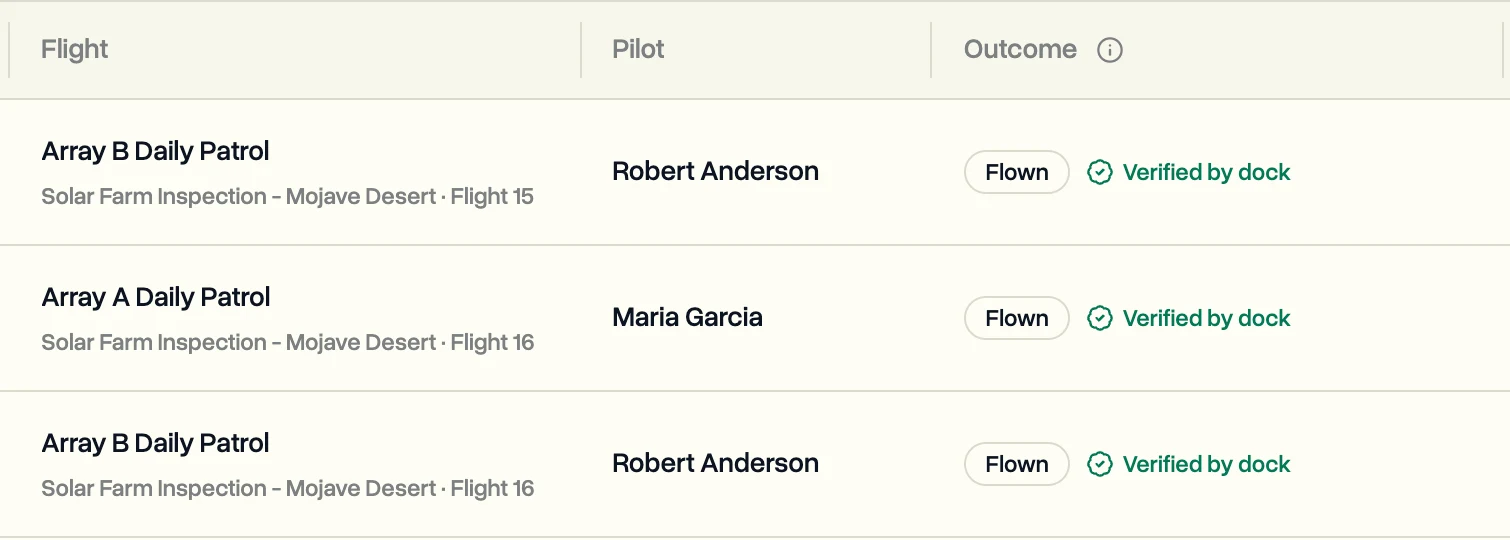
- The matching scheduled flight is marked flown, with the log as proof.
- Pilot hours
- Flights flown, airborne time and distance add up on each pilot.
- Maintenance
- Maintenance counters by flight hours, flights and charge cycles advance from every synced flight, from every brand, on Enterprise.
What you can take out
- Per flight
- A PDF flight report, a CSV of every reading, the processed log and the original raw file.
- Across flights
- Flight Summary totals for any date range as a PDF or CSV, and any project as a PDF or Excel file.
One record for every aircraft you fly
DJI drones, DJI Docks and Blue UAS aircraft land in the same flight list, with the same replay, statistics and exports.
Every flight opens the same way
Each flight record shows the path, duration, distance, altitude, battery use and the events found in the log, whichever brand flew it.

Dock flights arrive on their own
Connect DJI FlightHub 2 once, and each dock flight lands under its job, credited to the pilot on shift and marked flown, verified by the dock.
Why mixed fleets keep one record
When every aircraft lands in the same place, pilot hours, equipment use and maintenance stop depending on which app a flight came from.

One record for a mixed fleet
DJI, PX4, ArduPilot, Autel and Parrot flights sit in one workspace instead of one app per brand.
Blue UAS aircraft included
Freefly Astro, Teal 2, Inspired Flight IF1200 and Parrot ANAFI USA logs read the same way as DJI flights.

Hours and maintenance from every brand
Flight hours, pilot hours and equipment use add up across every aircraft, whichever maker built it.