Record what happened on a flight
Every scheduled flight ends with an outcome: flown, or not flown with a reason. Flight logs record most of them for you, and pilots or managers fill in the rest.
Pilots record their own flights from Assignments. Admins, project managers and operations leads can record or correct any flight from Flight Reports.
The outcome is what billing, flight hours and your reports count. Most of it records itself: when a flight log arrives that matches a scheduled flight, that flight is marked flown.
When a flight log does it for you
A log from a DJI Dock through FlightHub 2, from the DroneBundle app on a DJI controller, or from an upload finds its job and the scheduled flight whose time covers the takeoff. That flight is marked Flown, with a mark showing what backs it: the dock, the controller or the upload.
See Get your DJI flight logs into DroneBundle.
Record it yourself as a pilot
- In the sidebar, click Assignments.
- Find the flight.
- Flown it? Click Submit report and answer any questions your workspace asks.
- Didn't fly? Click Didn't fly, pick the reason, add a note for the office if you like, and click Submit report.
You can do the same in the DroneBundle app on your phone.
Check and correct flights as a manager
- In the sidebar, click Flight Reports. The Flights list shows every scheduled flight, with or without a flight log.
- Pick the period: today, this week, this month or Custom dates. Filter by project, pilot, outcome or report status.
- Open a flight, set the outcome to Flown or Not flown, pick a reason if it wasn't flown, and answer the questions.
- Click Save changes.
Saving records what happened. It does not approve the flight.
What needs review
Filter the list by Needs review to close out a period before billing:
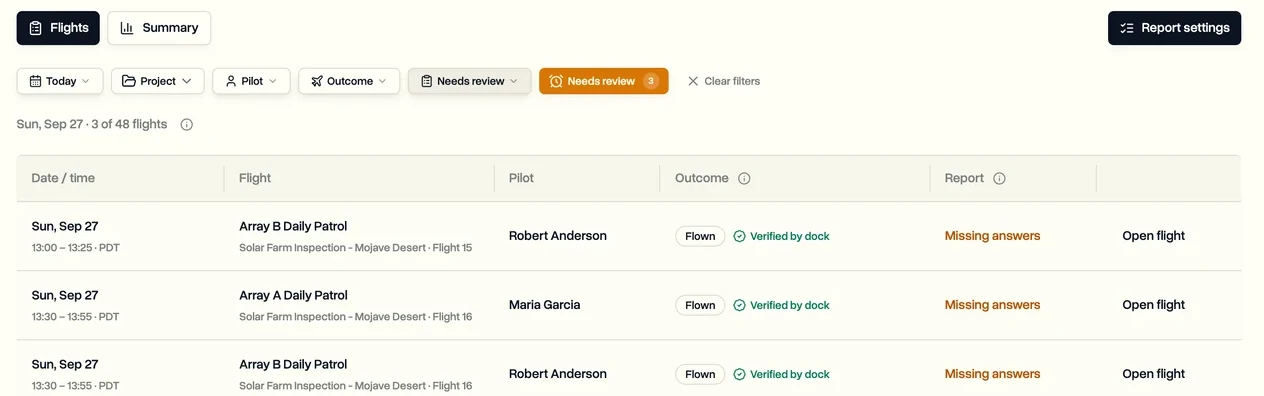
- Missing outcome: the flight's time has passed, no log matched and nobody recorded anything.
- Missing answers: the flight was flown, but a required question is still empty.
- Log says flown: the flight was marked not flown, but a flight log matches it. Check which is right.
Last updated Nov 17, 2026
Did this answer your question?
Still stuck?
Ask DroneBundle AI in the app, or email us and a person will answer.