Add up flights for billing with Flight Summary
Pick a period and see every scheduled flight added up by project and job: what counts for billing, what does not, and what still needs review. Export it as a PDF or CSV for the invoice.
Flight Summary turns the outcome of every scheduled flight into totals you can bill from. It's the step between flying the work and invoicing the client.
Open the summary
- In the sidebar, click Flight Reports, then Summary.
- Pick the period: this month, last month, the last 7 or 30 days, or your own dates, up to three months.
- Pick one project, several, or all of them.
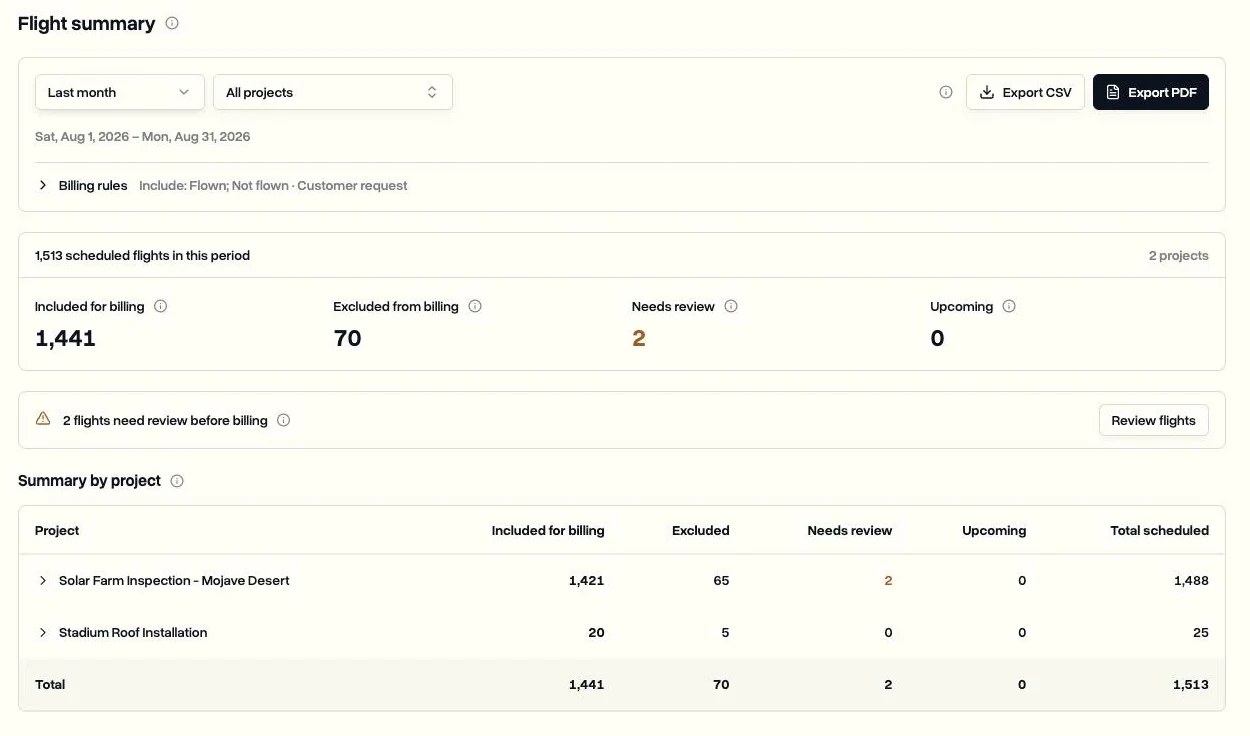
Read the totals
- Included for billing: flights that match your billing rules.
- Excluded from billing: flights with an outcome outside your rules.
- Needs review: flights with a missing outcome or missing answers, flights where the log says flown, and reports returned or waiting for approval.
- Upcoming: scheduled flights that aren't due yet.
Each project row opens into its jobs and then its flights, with the outcome, the pilot and the answers to your report questions.
Set your billing rules
Flown flights count by default. Open Billing rules and under Include these outcomes, tick any not-flown reasons that should count too, for example a cancellation at the customer's request. The rules are saved for the workspace and the totals update straight away.
Export for the invoice
- Export PDF: the totals, the billing rules used and the flights behind them, ready to attach to an invoice.
- Export CSV: one row per flight with the project, job, date, outcome, reason, pilots, whether a pilot or a dock log marked it flown, and one column per report question.
Close the period first. Clear everything under Needs review before you export, so the numbers you bill are final. See Record what happened on a flight.
Last updated Nov 17, 2026
Did this answer your question?
Still stuck?
Ask DroneBundle AI in the app, or email us and a person will answer.