Connect DJI FlightHub 2 for dock flights
Connect FlightHub 2 once and every flight from your DJI Dock arrives in DroneBundle about ten minutes after landing, linked to its job, with nothing to upload.
This is only available on the Team and Enterprise plans and during the free trial.
Works with DJI Dock, Dock 2 and Dock 3. On DJI's side you need the FlightHub 2 Enterprise plan. Nothing is installed on the dock or the controller, and it works for operators in the US.
Connect
- In DroneBundle, click Integrations in the sidebar, then DJI FlightHub 2.
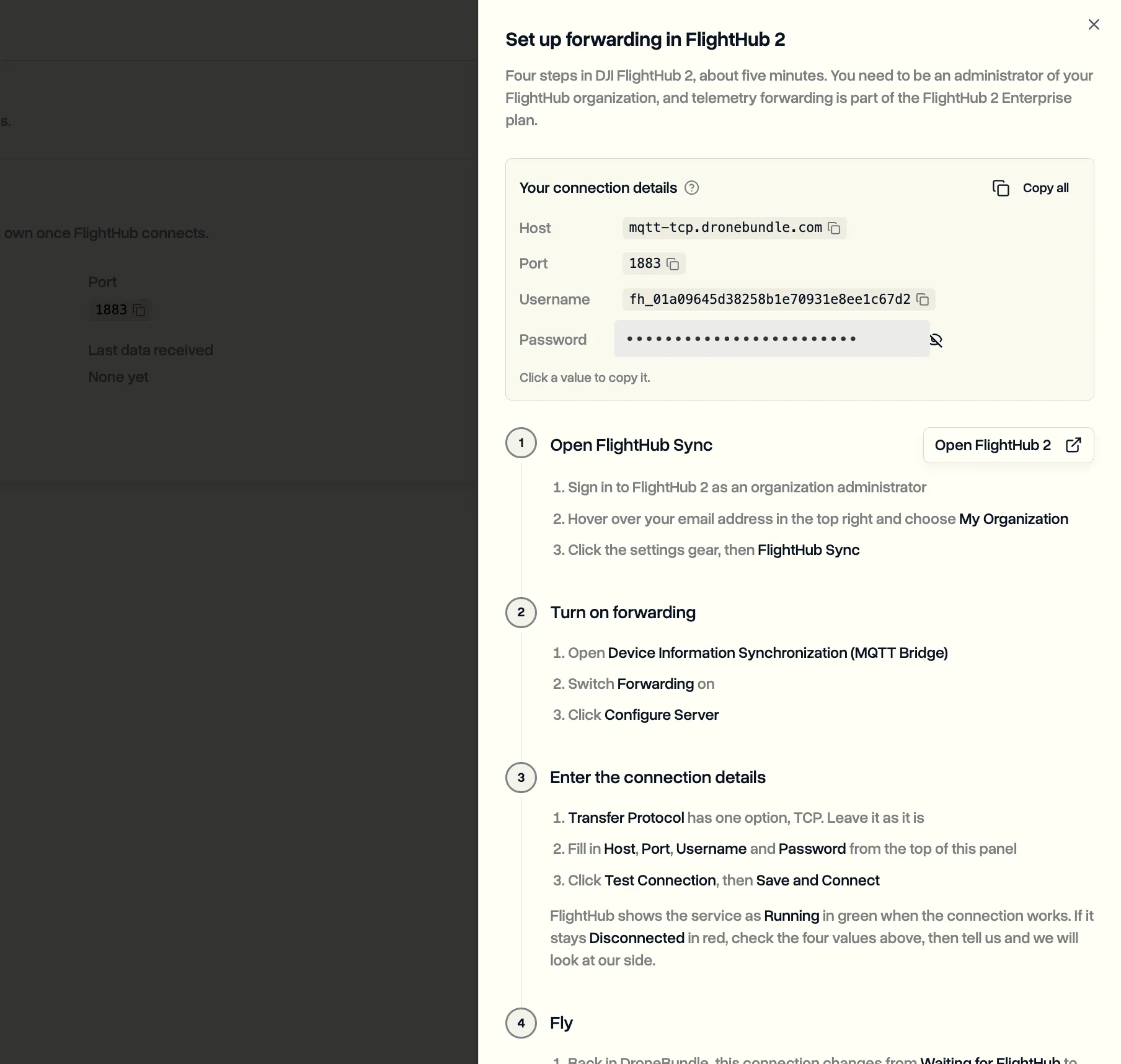
- Click Add connection. A panel shows your four connection details: host, port, username and password. Click any value to copy it.
- In FlightHub 2, sign in as an organization administrator, open My Organization, click the settings gear, then FlightHub Sync.
- Open Device Information Synchronization (MQTT Bridge), switch Forwarding on and click Configure Server.
- Paste in the host, port, username and password, click Test Connection, then Save and Connect.
The connection shows Waiting for FlightHub until the first message arrives, then turns to Connected on its own.
Keep the password private. It can only send flights in and cannot read anything, but FlightHub 2 sends it without encryption. You can show it again or replace it from the connection page at any time.
What happens after each flight
- The flight appears under Flight Logs about ten minutes after landing, with a Dock badge.
- It links itself to a job: first the job the dock is attached to as equipment, then a job or project whose area the flight crossed. If neither fits, it waits as unlinked and you get a notification.
- If a scheduled flight on that job covers the takeoff time, it is marked flown and credited to the pilot rostered on it.
- The dock, aircraft and batteries are added to Equipment the first time, and flight hours and battery cycles feed your maintenance counters.
A workspace can have up to ten connections. Disconnecting stops new flights within the hour. Flights already received stay.
Last updated Nov 17, 2026
Did this answer your question?
Still stuck?
Ask DroneBundle AI in the app, or email us and a person will answer.