New Feature
DroneBundle for iPhone: Run the Job From the Field
mobile-appiosiphonefield-workjob-statusphoto-uploadjob-feedairspaceflight-approvals
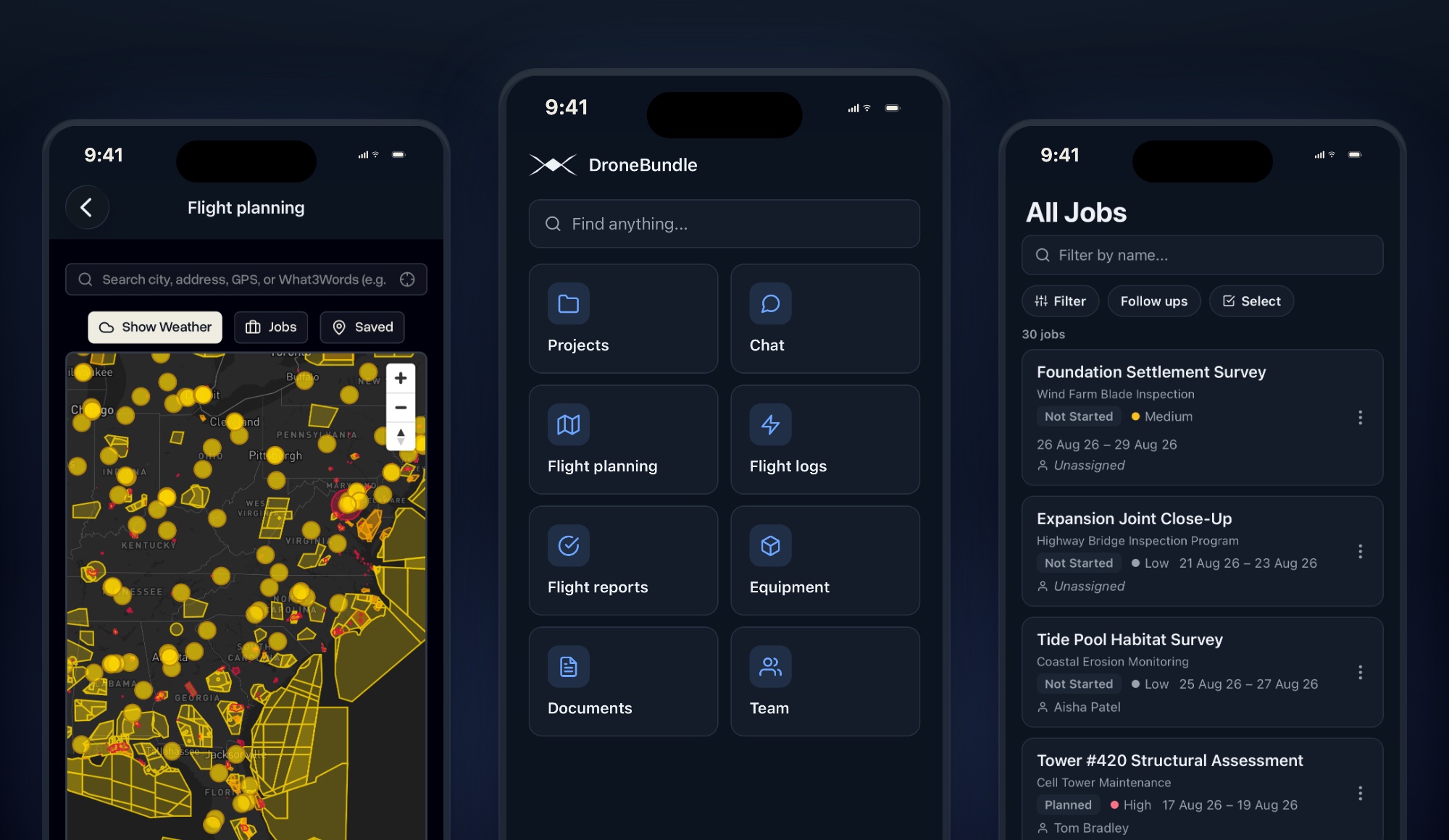
The DroneBundle app is on the App Store. Sign in with the account you already have and take your jobs, the schedule, site photos, and the airspace map onto the site with you.
Sign In and You Are There
The same workspace, the same jobs, the same people, on the phone already in your pocket.
- Enter the email and password you use for DroneBundle
- No setup, nothing to configure, and nothing new to learn
- Pilots open straight onto their own assignments
- Managers land on an overview of the whole operation
- Nobody sees more than their permissions allow, exactly as on the web
Your Jobs, On Site
- Every job you can see, with its project, status, priority, dates, and pilots
- Filter by name, status, priority, pilot, project, type, or overdue only
- Update status is the first thing on a job, above everything else
- Your own status pipeline, not a generic list
- Change start and end dates on the spot
- Add or swap pilots without opening a laptop
Photos Before You Leave the Site
- Take photos with the camera or pick them from your library
- File them on a job or a project as before, during, after, or general
- Each upload shows its progress, and anything that fails can be sent again
- Photos taken on site end up where the client will look for them
The Schedule, Sideways
- The job feed on the phone, in landscape, for managers
- Timeline by week or month, or a calendar grid for the month
- Filter by pilot, project, status, or priority, and change what each row shows
- Recurring work is drawn as each of its occurrences
- Today snaps you back to now
Airspace and Weather at the Site
- Search a city, an address, coordinates, or a What3Words location
- Airspace zones for the United States and across Europe, from official sources
- Turn on the weather for the site, and put your jobs on the map
- Save the places you keep going back to
- Advisory only, the same as the dashboard: it grants no permission to fly
Projects, Files, and Discussions
- Projects across active, follow ups, archived, and pinned, with their jobs and files
- Open, download, or add files, so what you need on site is on the phone with you
- Message the team on a project and mention people directly
- Send a message to specific people only, with an expiry or a password
- Documents, equipment and who is holding it, and the team list
Flight Reports and Approvals
- Pilots see their approved flights
- Managers see what is waiting, read the pilot's note, and approve or reject with a reason
- An approval can be reverted, with a reason, so the record shows what happened
- Billing and reporting stop waiting for someone to be at a desk
Made to Fit You
- Follows your phone's light or dark setting, or pin it to one
- Distances, pressure, and wind speed use the units you already chose
- Your flight hours window comes across from your account
- Email preferences can be changed from the phone
Where to Get It
- On the App Store now, free with every DroneBundle account, on every plan
- Coming to Google Play for Android
- Accounts are created on the web by your admin, so there is no signup in the app
- Creating projects, invoicing, and account administration stay on the web dashboard