New FeatureNew
Flight Summary and Custom Flight Reports for Drone Billing
flight-summaryflight-reportsreport-questionsbillingnot-flown-reasonspdf-exportcsv-exportrecurring-jobs
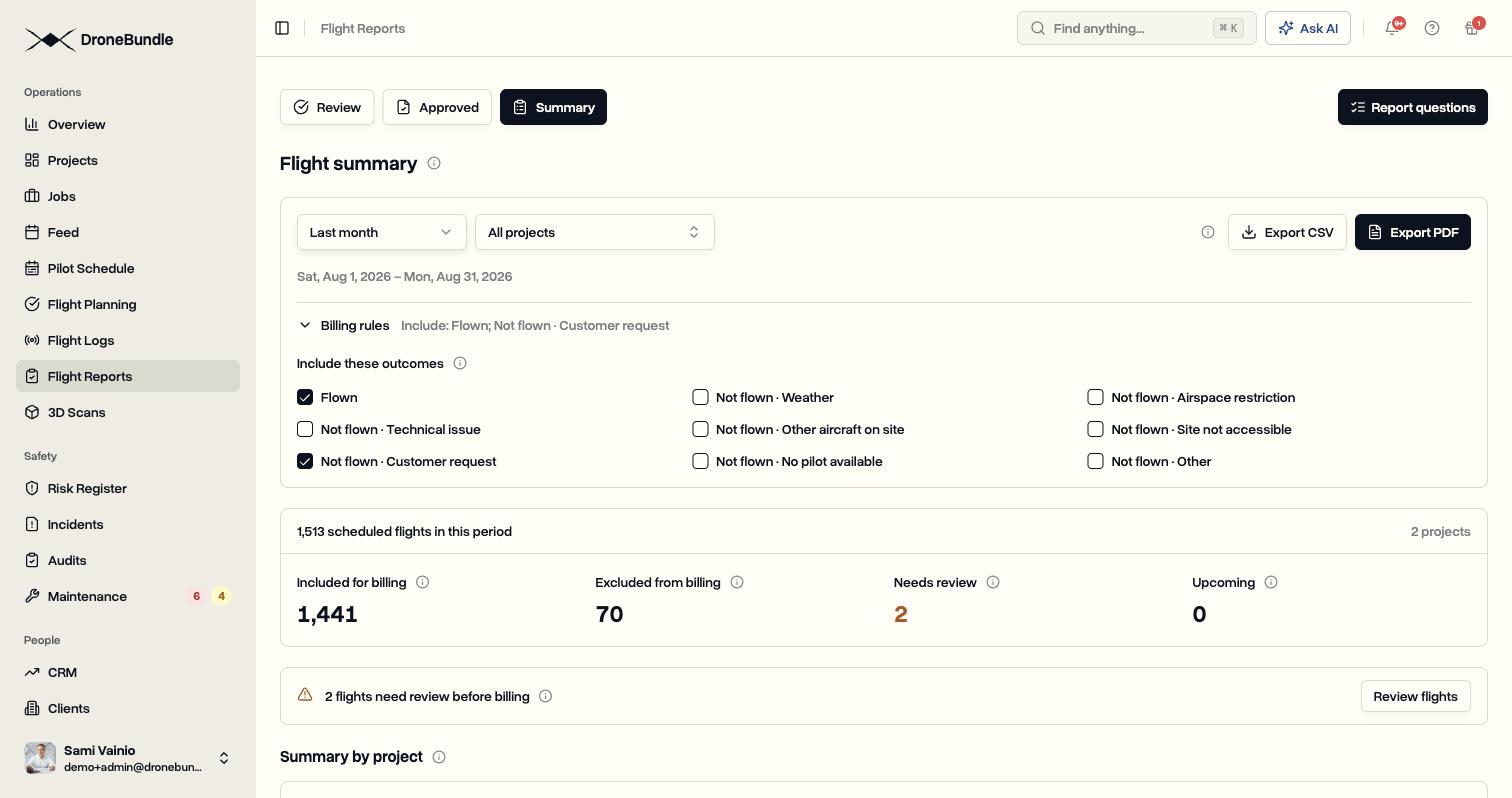
Every scheduled flight now ends with an outcome: flown, or not flown with a reason. Pilots answer your own questions when they mark a flight complete, and Flight Summary adds it all up for any date range, with billing rules you set once and a PDF or CSV ready for the invoice.
Every Flight Gets an Outcome
- Mark a flight flown, or not flown with a reason: weather, airspace restriction, technical issue, other aircraft on site, site not accessible, customer request, no pilot available, or other
- Add a short note so the office knows what happened
- Pilots record it from the mobile app, and the office can mark several flights at once from the job
- Dock flights from FlightHub 2 sync are marked flown automatically when the log arrives
Custom Flight Reports
- Write the questions pilots answer after each flight, up to 20 per workspace
- Four kinds of answer: a number with a unit, a choice from a list (one answer or several), yes or no, and a note
- Each question can apply to every job or only to certain job types, so pilots only see the ones that fit the flight
- Make a question required and the flight cannot be marked complete without it
- A preview shows exactly what the pilot will see while you write the question
- Pilots answer on the web and in the mobile app, and answers can be corrected later from the flight's report
- Old flights keep the questions they were answered against, even after a question is renamed or removed
Flight Summary
- A new Summary tab under Flight Reports
- Pick this month, last month, the last 7 or 30 days, or any range up to three months, for one project, several, or all
- Four totals: included for billing, excluded from billing, needs review, and upcoming
- A row per project that opens into its jobs and then its flights, with the outcome, the pilot, and the answers to your questions
- Needs review lists flights whose time has passed with no outcome, and flights sent back for changes, so the month can be closed before billing
Billing Rules
- Flown flights count by default
- Tick any not-flown reasons that should count too, for example customer request
- Rules are saved for the workspace, and the totals update as soon as they change
Exports
- PDF with the totals, the billing rules applied, and the flights behind them, ready to attach to an invoice
- CSV with one row per flight: project, job, date, time, outcome, reason and note, included or not, pilots, completion time, whether a pilot or a dock log marked it flown, and one column per question
Where It Lives
- Flight Summary is on the Professional, Business, and Enterprise plans and every free trial, for owners, project managers, and ops leads
- Report questions are set up by owners and project managers from Flight Reports, Report questions, or under Settings, Customization, Flight report details