New FeatureNew
Dock Weather: The Conditions Behind Every Dock Flight
dji-dockflighthubweatherflight-reportsflights
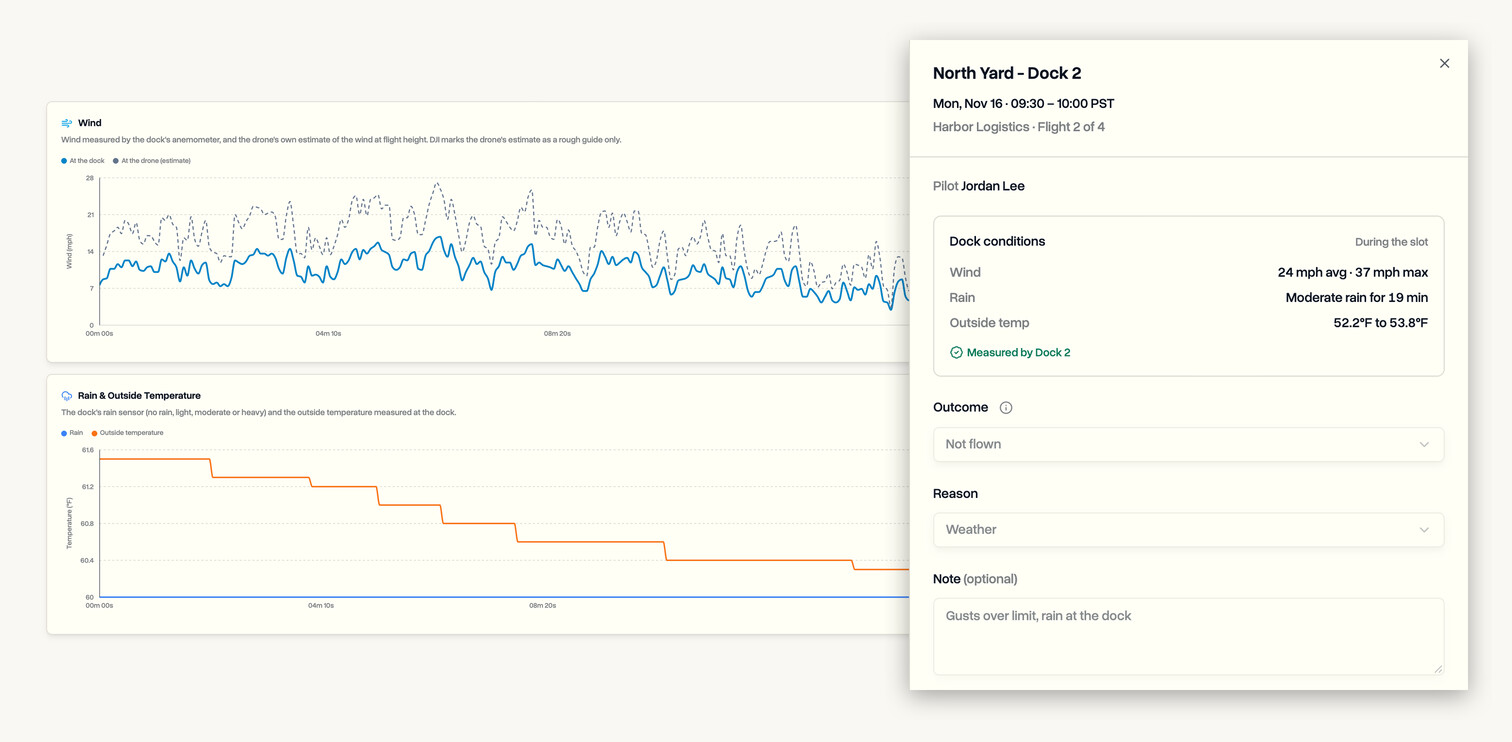
DroneBundle now records the weather your DJI Dock measures. Every dock flight shows the wind, rain and outside temperature during the flight, and every scheduled flight in Flight Reports shows what the dock measured during its slot, so a flight called off for weather comes with the readings that back it up.
Weather on Every Dock Flight
- Wind at the dock from its anemometer, as an average and a maximum
- The dock's rain sensor: no rain, light, moderate or heavy, and for how long
- Outside temperature at takeoff and across the flight
- The drone's own estimate of the wind at flight height and where it came from, clearly marked as an estimate
- Wind and rain charts across the whole flight, alongside altitude, speed and battery
Evidence for Every Scheduled Flight
- Open any scheduled flight in Flight Reports to see the dock's wind, rain and temperature for that slot
- Flights that were not flown get the same readings, so a weather call sits next to the numbers behind it
- Flown slots show the conditions during the flight, with a link straight to the flight log
- Every reading is marked as measured by the dock, not a forecast
Take It With You
- Weather is in the flight's CSV export and PDF report, and on each flight in the DroneBundle API
- Dock flights from before this release already have their weather filled in
- Wind and temperature follow your unit settings
Who Can Use It
- Part of the DJI Dock and FlightHub 2 sync, on the Team and Enterprise plans and in every free trial
- Works with DJI Dock 2 and Dock 3
- Nothing to set up: if your docks are connected, the weather is already there