New FeatureNew
Custom Roles: Give Each Person Exactly the Access They Need
custom-rolesteampermissionsrolesenterprise
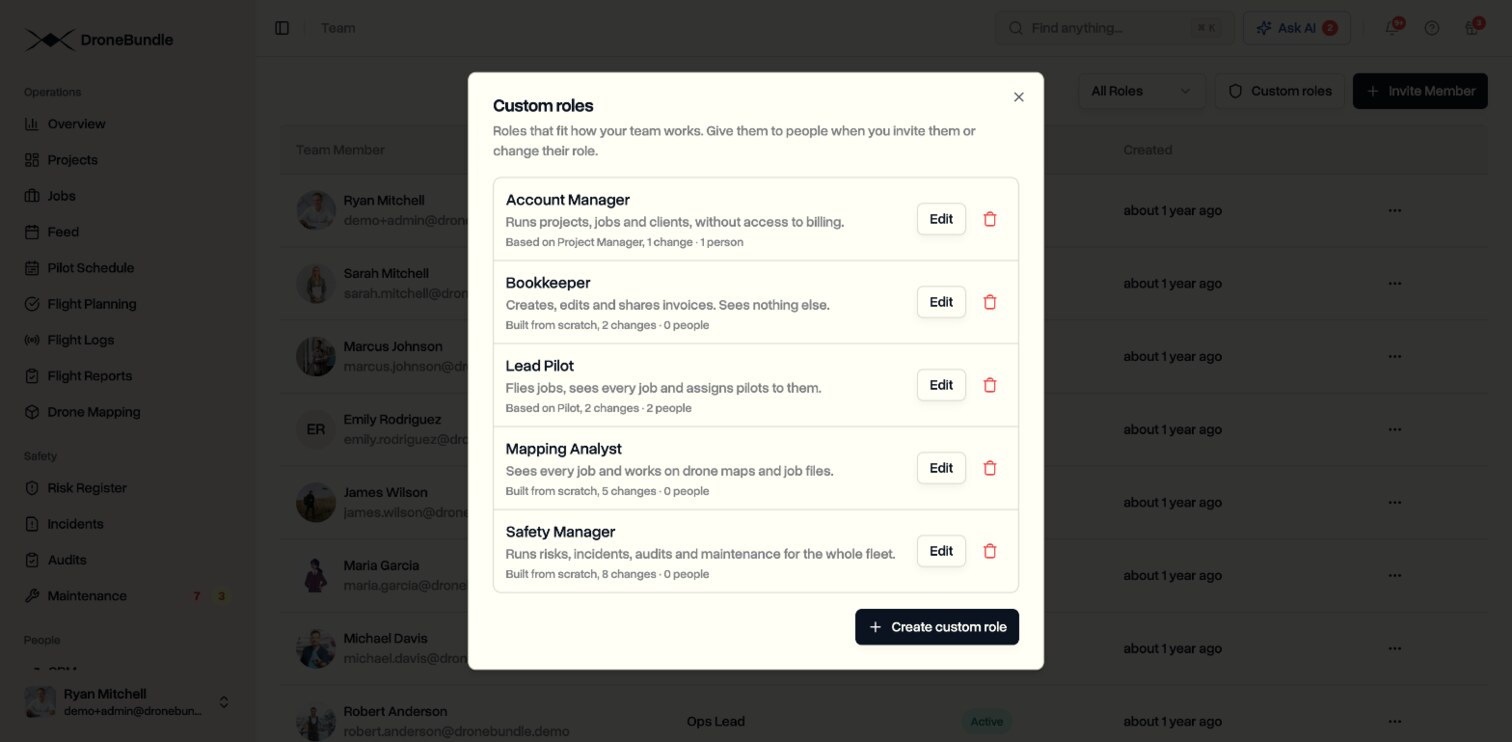
Build your own roles on top of Pilot, Ops Lead and Project Manager, or start from blank. Switch each action on or off, choose how far it reaches, and give the role to people when you invite them or change their role.
Build a Role in a Few Clicks
- Start from Pilot, Ops Lead, Project Manager or a blank role
- Switch actions on or off across projects, jobs, the schedule, files and maps, flights, equipment, safety, maintenance, documents and invoices, clients, the team and the workspace
- For many actions, choose how far they reach: everything, only what the person is given, or only their own work
- Give each role a name and a short description, shown under it whenever you pick a role
Give It to the Right People
- Pick a custom role when you invite someone or change their role
- Change Role shows what the starting role does and exactly what your role changes
- Find, edit and delete every role from the Custom roles button on the Team page
- A role that people still have cannot be deleted, and DroneBundle shows who has it
The Role Follows Them Everywhere
- The dashboard, the mobile app, DroneBundle AI, search and Slack all follow the custom role
- A Bookkeeper sees invoices, a Lead Pilot assigns pilots, and a Safety Manager runs risks, incidents and audits, with nothing else in their way
Who Can Use It
- Workspace admins and project managers create, edit and delete custom roles
- Nobody can edit the custom role they have themselves
- Custom roles are on the Enterprise plan and in every free trial