Send a message only chosen people can see. Set a message to disappear after an hour, a day, or a date you pick. Lock sensitive details behind a password that is never stored anywhere.
Think about what passes through a project discussion over a few months: gate codes for a restricted site, a contact's personal phone number, commercial details that are not ready for the whole team, credentials for a client's upload folder. A discussion thread is the natural place to share these things, and also the worst place for them to sit in plain text forever, readable by everyone who joins the project later.
Until now, every message in a DroneBundle discussion was visible to every participant, indefinitely. That is the right default for coordination, and the wrong tool for sensitive information. The usual workaround is moving those details to text messages or phone calls, which scatters operational information across channels your project records never see.
Discussions and team chat now include three protection options you can apply to any message: private visibility, automatic expiry, and password protection. Use them one at a time or stack all three on a single message.
Send Securely
A shield button next to the send button opens the Send securely menu. Three switches, each independent: Private message, Expires, and Password protect.
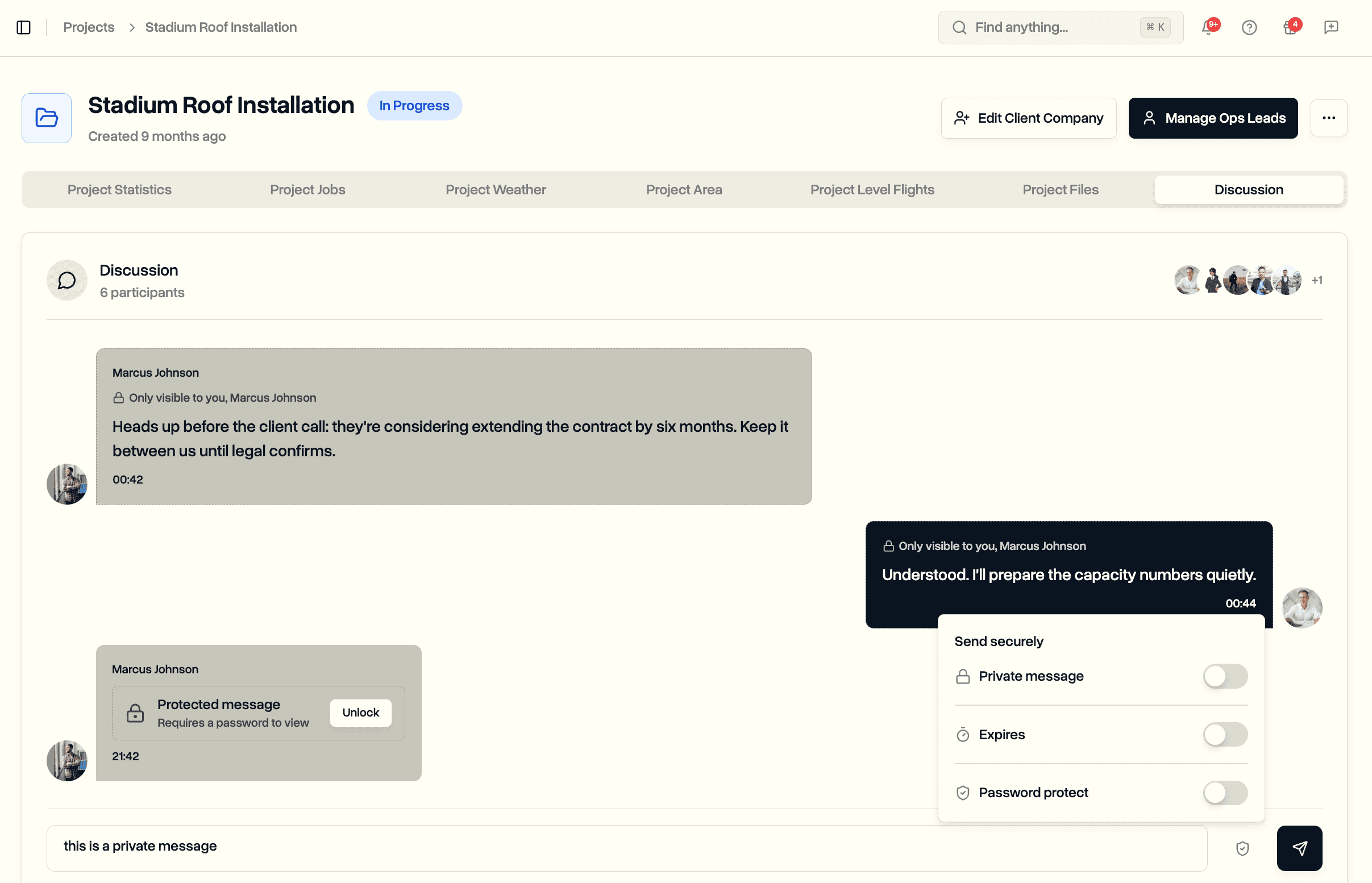
While any option is active, a small tag appears above the message box showing exactly what is armed, for example "Private, 2 people" or "Expires in 24 hours". The tags stay visible until you send, so there is no guessing about which protection applies to the message you are about to post. One click on Clear removes all of them.
Private Messages
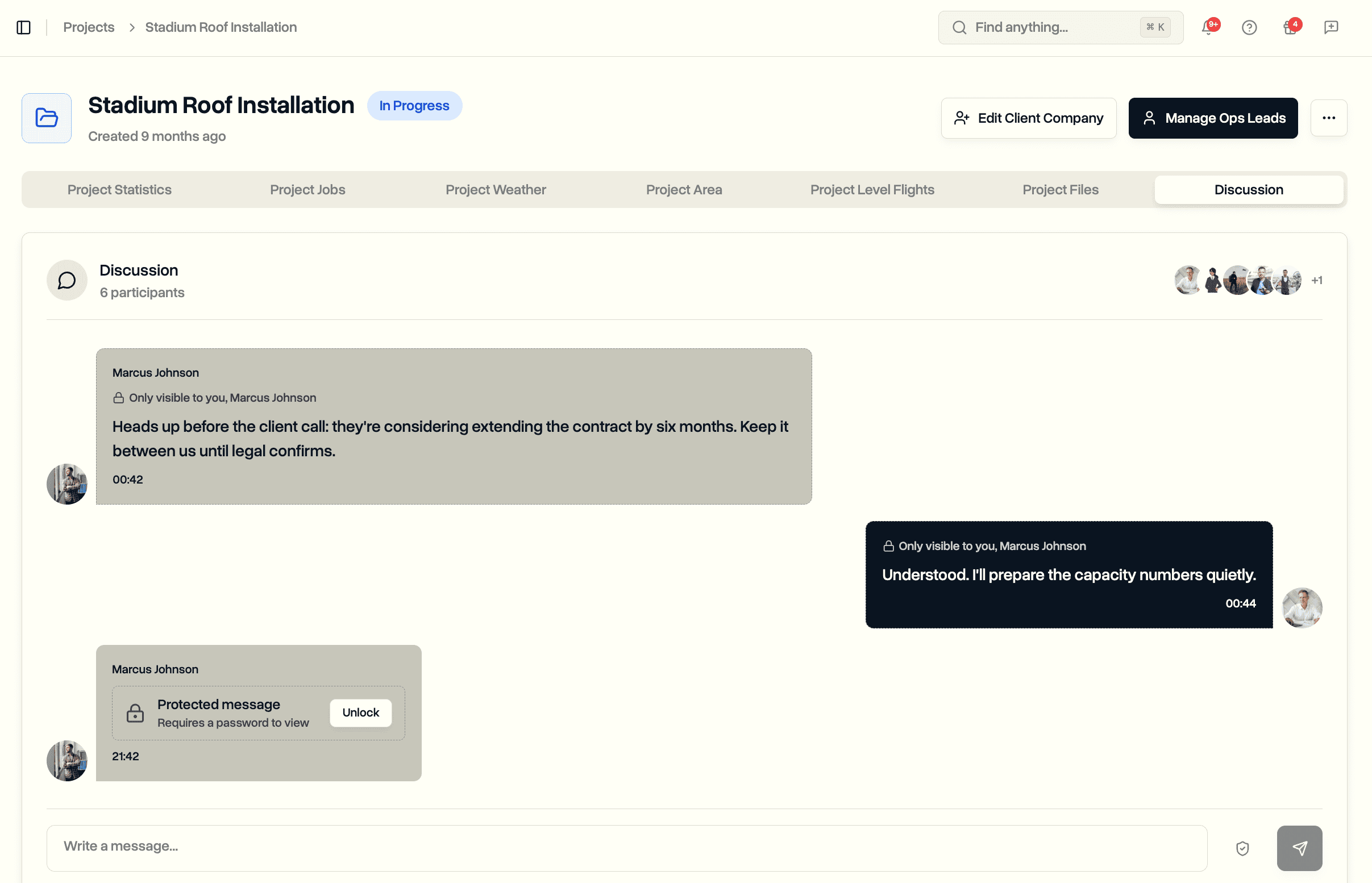
Switch on Private message and pick recipients from your team. Only the people you pick (and you) will ever see the message. For everyone else the message simply does not exist: it never appears in their thread, never shows in previews, and never reaches their notifications.
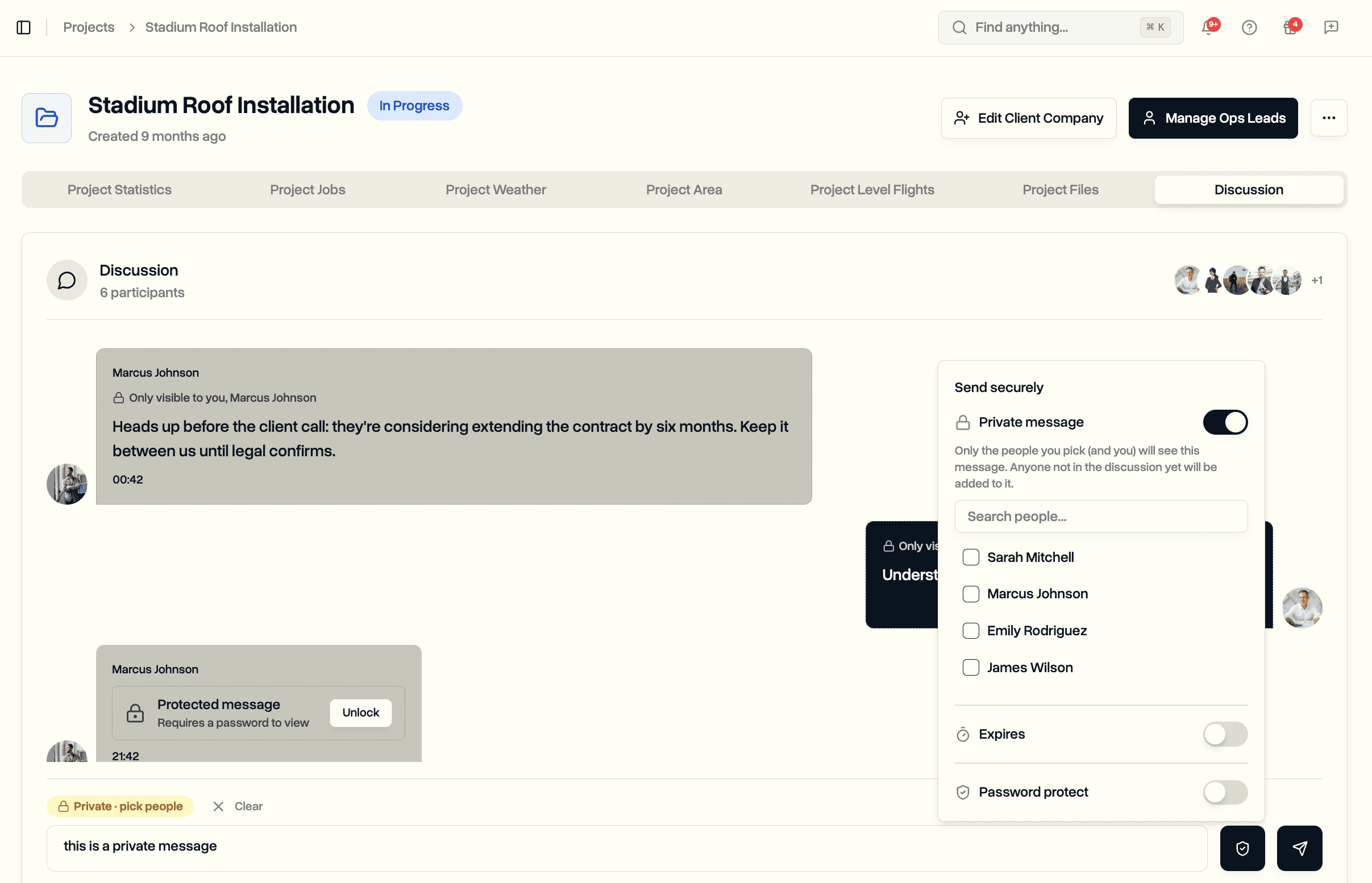
The recipient list works like @mentions. You can pick anyone on your internal team, and if they are not part of the discussion yet, sending the private message adds them. Pilots and ops leads need to be on the project to be picked, the same rule that already governs who you can mention. Clients are never available as recipients.
Recipients see a lock line above the message: "Only visible to you, Marcus Johnson". Privacy is absolute. There is no override that lets workspace admins read private messages they were not included in.
One example of where this fits: a project manager and an ops lead need to discuss a commercial detail in the context of the project, but the assigned pilots do not need it in their feed. The conversation stays in the discussion, attached to the project, without starting a separate thread somewhere else.
Expiring Messages
Switch on Expires and choose how long the message should live: one hour, 24 hours, 7 days, or a custom date with an exact time. The custom option shows the precise expiry moment before you send, formatted the way your browser displays dates, so a team spread across the US and Europe each reads it in their own convention.
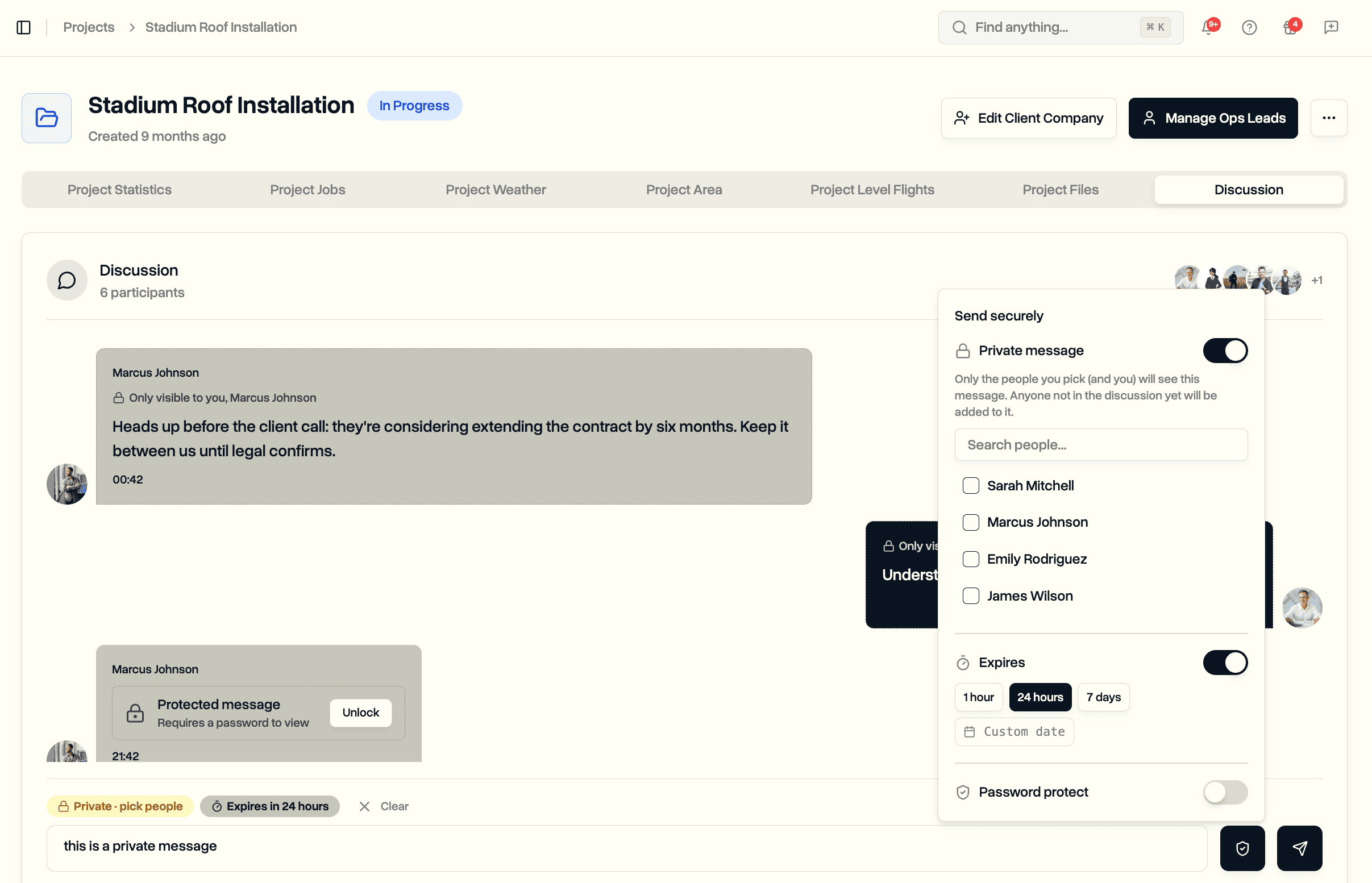
Live messages carry a countdown that everyone in the discussion can see, and it turns amber as the deadline approaches. When the time arrives, the content stops being readable for everyone at the same moment and the message is removed from storage shortly after. What remains in the thread is a small note that a message expired, so the conversation history does not develop silent gaps.
Temporary information gets a lifespan that matches reality. A parking code that rotates daily has no business being readable in next quarter's thread, and an audit of old discussions should not turn up a pile of stale access details.
Password-Protected Messages
Switch on Password protect and the message content is locked with a password of your choice, or a generated one. The text is encrypted using the password itself as the key, and the password is never stored. Not in the message, not on our servers, nowhere. Without the password the content cannot be read, by anyone, including us.
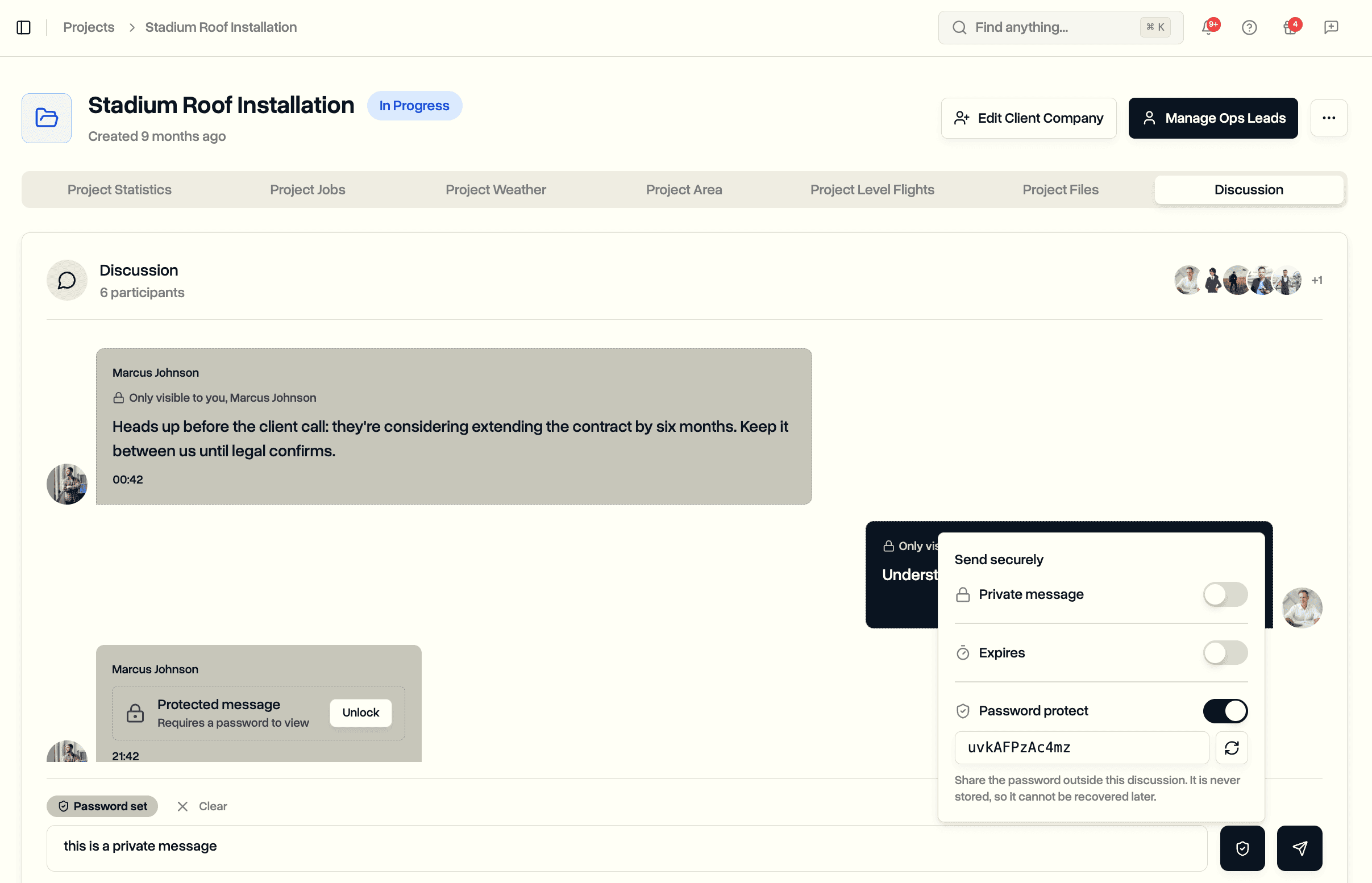
In the thread, a protected message shows as a locked card with an Unlock button. Entering the right password reveals the content on the spot. The unlocked text is shown only to the person who entered the password and is not kept anywhere afterwards. Repeated wrong guesses are blocked for a while, so the lock cannot be brute-forced by trial and error.
Share the password outside the discussion: over the phone, in person, or through whatever channel your team already trusts for credentials. The pattern is the same one used for sharing version-controlled documents with restricted access, applied to a single message.
The honest trade-off: because the password exists only with you, there is no recovery. If it is lost, nobody can unlock the message, including us, and the only fix is sending it again with a new password. That is not a limitation we worked around. It is the proof the protection is real. A password we could remind you of would be a password we are keeping somewhere.
A protected message can also be private and expiring at the same time. A gate code sent to two named people, locked behind a password, gone in 24 hours: that is all three switches on one message.
What Everyone Else Sees
Protection would not mean much if the content leaked around the edges, so the edges are covered too.
Chat list previews show "Private message" or "Protected message" instead of the actual text. Notification emails for a protected message tell the recipient to open the discussion rather than including the content. Private messages only ever notify the people on the recipient list, and @mentions inside a private message are limited to people who can actually see it.
Everything works in both places your team talks: the Discussion tab on each project and the standalone Chats page. Pilots and ops leads get the same three switches, the same lock indicators, and the same unlock flow as managers, whichever screen they live in.
Use Cases
Site access details. Gate codes, lockbox locations, alarm procedures. Password-protect the message and set it to expire when the code rotates. The maintenance crew that joins the project next month never inherits a thread full of dead credentials.
Commercially sensitive coordination. Contract discussions, pricing, staffing changes. Keep them private between the people who need them while the rest of the discussion stays open to the full team, including conversations that later feed your risk register or incident reports.
Client-side credentials. If a client hands you login details for their upload portal or shared folder, pass them to the assigned pilot in a protected, expiring message instead of a plain text one that outlives the job.
Regulated environments. Operations working under formal data-handling rules can keep sensitive operational chatter inside the platform, where access is controlled, instead of pushing it to personal phones. Combined with API keys and custom workflows, the discussion becomes part of the system of record rather than an exception to it.
Availability
Secure messages are available now on Team and Enterprise, the plans that include team chat. There is nothing to configure: the shield button appears in every project discussion and chat, and any participant can use all three options.
Start your free trial to try private, expiring, and password-protected messages with your team.
Book a demo to see how DroneBundle keeps sensitive operational details inside your workspace.