New Feature
DroneBundle AI: An Assistant That Answers Questions and Creates the Work
dronebundle-aiai-assistantjob-creationpilot-assignmentapprovalsproject-managementautomation
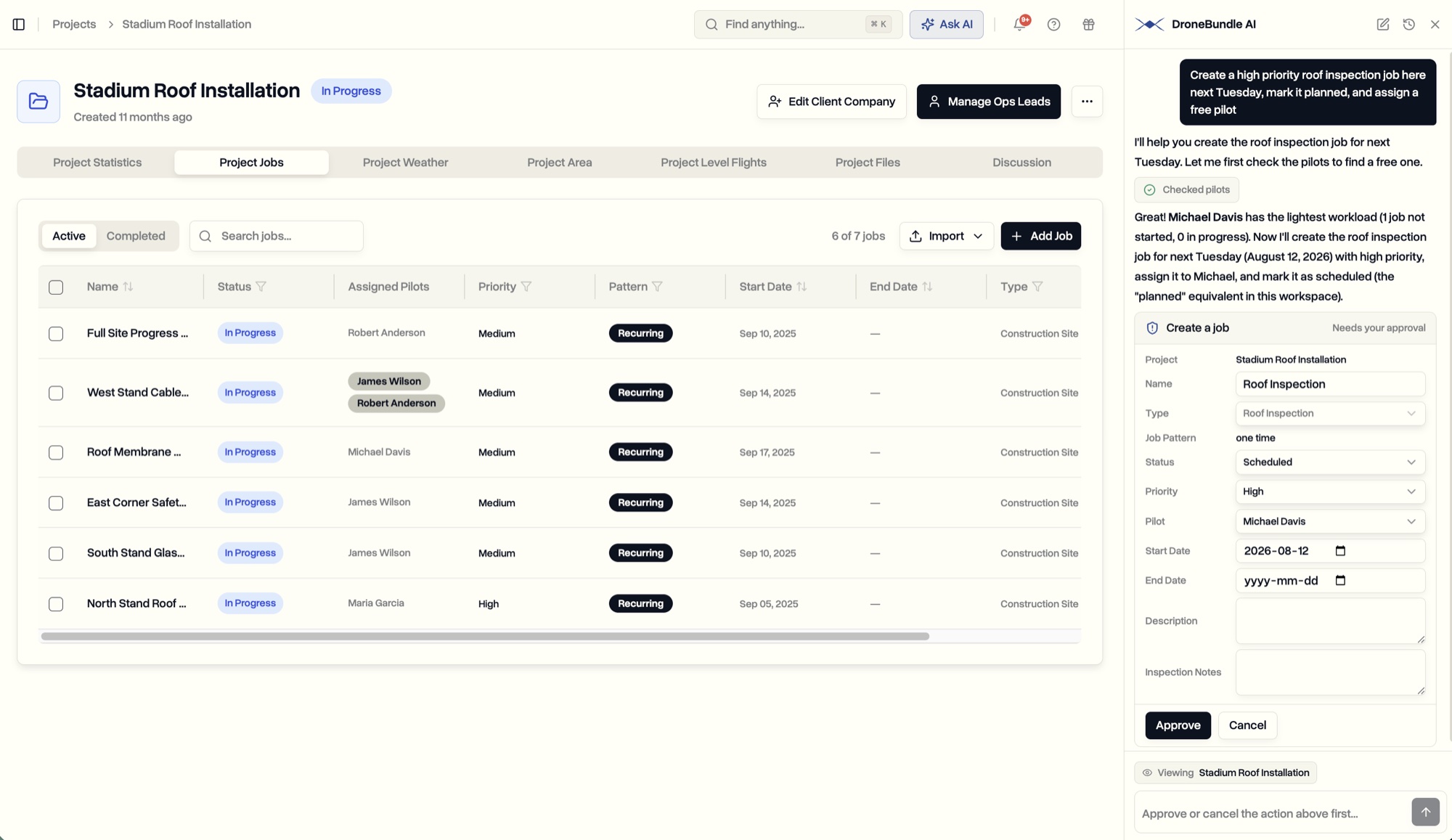
Open the assistant from any page and ask. It reads your whole workspace to answer, and when there is work to do it proposes it as a card you approve, edit, or cancel.
An Assistant Inside the Dashboard
One keystroke away on every page, reading the same workspace you do.
- Press ⌘J, or Ctrl+J on Windows, or click Ask AI in the top bar
- The panel opens beside your work and the page stays where it is
- Answers come back as plain sentences and tables, not a wall of records
- Ask for something with fifty results and you get the count and the ones that matter
What It Can Look At
One question can span the whole operation, because it can pull from several places at once.
- Projects and jobs, pilots and what they are assigned to, clients and your sales pipeline
- Flights, the ones waiting for approval, and project discussions
- Equipment and who is holding it, maintenance, and the weather at a job site
- Your risk register, incidents and audits, invoices, documents, and the files attached to projects and jobs
It Knows the Page You Are On
Most questions you have while working are about the thing on your screen.
- A Viewing tag above the message box names the page it can see
- Open a job and ask who is on this, and it answers about that job
- Say create a job here and it uses the project you have open, without you naming it
- On a list page it says so rather than picking an item for you
- The suggestions in an empty chat change with the page
Actions You Approve
Ask for something to be done and it proposes the finished thing rather than asking a list of questions.
- It works out what it can from your request, the page you are on, and your workspace
- The proposal arrives as a card, and nothing is written until you approve it
- Every field is editable first, so a wrong guess costs one click
- Cancel and nothing happens at all
- After it runs, it confirms in a sentence with a link straight to what it made
What It Can Do For You
- Create a project, or a job inside one, including recurring jobs
- Assign pilots to a job
- Change a project's or a job's status
- Edit a job's details, dates, priority, and the notes the pilot sees
- Approve or reject a flight waiting in the review queue
- Report a safety incident, or add a risk to the register
- Everything else it does is reading, so no question can change your records by accident
It Speaks Your Workspace
- Uses your own status names and job types, never an internal code or a long reference number
- Will not offer a status your workspace does not have
- Understands that work in follow ups is on hold rather than gone, and looks there when something seems missing
- Knows a flight in the review queue is waiting on a person, not stuck
Conversations Keep Their Place
- Every chat is saved and named after what you asked
- Reopen a previous conversation from the history menu and carry on
- Start a fresh chat whenever the subject changes, and delete any you no longer want
- Close the panel and the conversation waits
Private by Default
- Runs on European servers, in the same place your DroneBundle data already lives
- Your questions and records never leave the EU to be answered
- Nothing you type or store is used to train AI, and nothing is shared with anyone else
- It reads only what it needs, and asks before it changes anything
Where It Lives
- The Ask AI button in the top bar of every page, or ⌘J
- Root and project manager roles, the same people who already have that view across the workspace
- Available on every plan, with nothing to switch on