Custom Status Pipelines: Build Project and Job Workflows Your Way
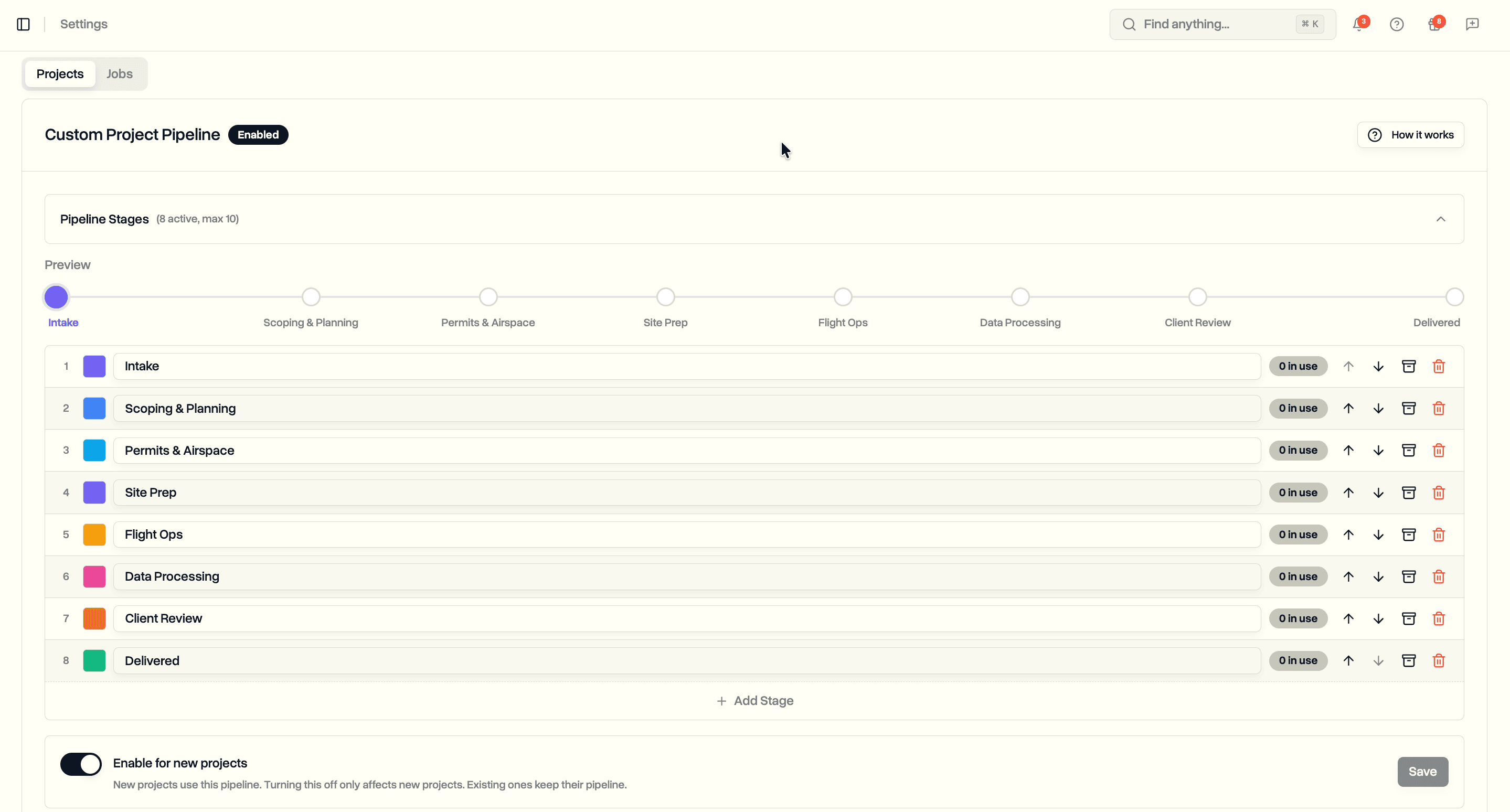
Define ordered status pipelines for projects and jobs at the workspace level. Pick stages, colors, and categories that match how your team runs. Every record renders with a stepper showing where it sits and what comes next.
Custom Pipelines (Enterprise)
Two independent pipelines under Settings → Customization → Projects and Jobs. Enable one, both, or neither.
- One to ten stages per pipeline, each with a label (up to 50 characters), color, and position
- Color palette with preset swatches plus a custom hex input
- Up and down arrows to reorder stages
- Archive a stage to hide it from new pickers without deleting it
- First non-archived stage is the starting point for new records
- Stages rename, recolor, and reorder live across every record using the pipeline
Project Pipeline
Replace the fixed eleven project statuses with stages that match your delivery process.
- Forward-only enablement: new projects stamped with the pipeline; existing projects keep their original status
- Non-destructive disable: turning the toggle off only affects new project creation
- Works alongside the default eleven for teams that prefer them
Job Pipeline
Independent job pipeline with a required category on every stage.
- Three categories: Not started, In progress, Completed
- Categories drive pilot-profile counters: jobs not started, in progress, and completed keep aggregating correctly regardless of the labels you pick
- Smart defaults in the builder (first stage → Not started, last non-archived → Completed, middle → In progress) with admin override
- Validation requires at least one Not started stage and at least one Completed stage
Pipeline Stepper
A read-only stepper across the top of every project and job that uses a pipeline.
- Filled dots for completed stages, highlighted dot for current, hollow dots for future
- Archived stages skipped from the forward path unless the record itself sits on one (then shown muted with an Archived tag)
- Status dropdown remains the control; stepper is visualization only
Live Edits with Guardrails
Pipelines are editable at any time.
- Rename, recolor, and reorder apply immediately across every record using the pipeline
- Archive at any time
- Delete only when no records sit on the stage; the settings UI shows a live count per stage and swaps Delete for Archive when records exist
Filtering and Bulk Updates
Default and custom statuses coexist inside a single workspace without fighting.
- Status filter on project and job lists shows Default and Custom tabs when a pipeline is enabled
- Selections from both tabs union on submit
- Bulk status dialog uses the pipeline when every selected record is on the pipeline, the defaults when every record is on the defaults, and disables with a tooltip when the selection mixes both
Emails, Notifications, and Search
- Status change emails and in-app notifications render the admin-defined labels
- Completion email and notification fire on any stage in the Completed category, not only the literal "completed" status
- AI-powered search indexes the admin-defined labels, so natural language queries match the wording you picked
Permissions and Plan
AdminandProject Managerroles can build, enable, disable, and edit pipelines- Everyone else sees and uses the stages but cannot change them
- Enterprise plan; projects and jobs are gated independently