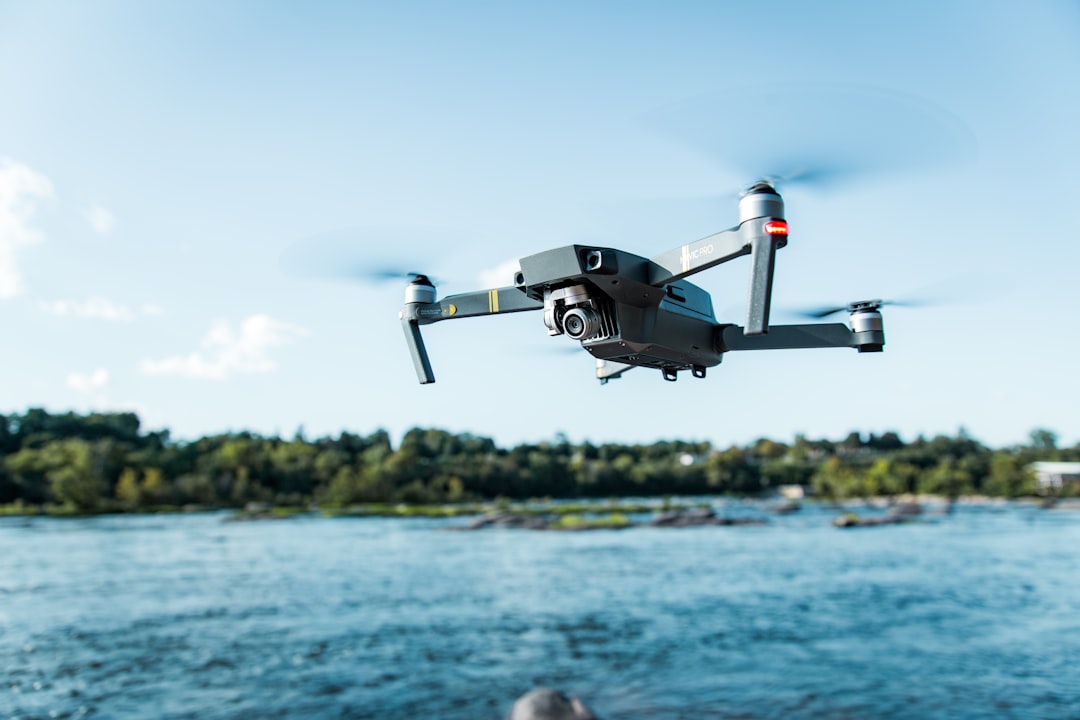
Headless mode on a drone locks the control orientation to the pilot's perspective rather than the aircraft's nose direction. When you push the stick forward, the drone flies away from you. Pull back, it comes toward you. Left goes left. Right goes right. It does not matter which way the drone's front is actually pointing.
For anyone who has ever panicked while a distant drone ignored their stick inputs in the expected direction, that single feature can feel like magic. But headless mode comes with real trade-offs that every pilot should understand before relying on it.
Contents
- How headless mode actually works
- When headless mode is genuinely useful
- The compass problem: why headless mode fails
- Do DJI drones have headless mode?
- Headless mode vs. FPV: two different solutions
- Why commercial pilots avoid headless mode
- How to activate headless mode on your drone
- Frequently asked questions
- Should you use headless mode?
How headless mode actually works
Headless mode uses the drone's built-in magnetometer (digital compass) to record a reference bearing at the moment you activate the feature, typically right before takeoff. From that point on, the flight controller translates every stick input relative to that saved bearing instead of the aircraft's current heading.
In normal flight mode, pushing the right stick forward tells the drone to pitch forward relative to its own nose. If the drone has rotated 180 degrees to face you, "forward" on the stick now sends the drone further away from you rather than closer. This is the single biggest source of confusion for new pilots and the reason orientation-related crashes are so common during the first few flights.
Headless mode eliminates this mental math. The flight controller intercepts your stick commands, compares the drone's current heading against the stored reference bearing, and adjusts motor outputs so the drone moves in the direction you expect from your standing position.
Here is a simplified comparison:
| Stick Input | Normal Mode | Headless Mode |
|---|---|---|
| Forward | Drone moves toward its own nose | Drone moves away from pilot |
| Back | Drone moves away from its own nose | Drone moves toward pilot |
| Left | Drone moves to its own left | Drone moves to pilot's left |
| Right | Drone moves to its own right | Drone moves to pilot's right |
The key hardware component is the magnetometer. Without a stable compass reading, the drone cannot calculate the offset between its current heading and the stored reference. This is why compass calibration matters so much for headless mode, and why certain environments cause the feature to fail entirely. Understanding how drones avoid obstacles helps illustrate how sensor data drives every aspect of flight control, not just collision avoidance.
When headless mode is genuinely useful
Headless mode serves a narrow but important set of situations well.
First flights. If you have never flown a drone before, headless mode lets you focus on throttle control, altitude management, and spatial awareness without also needing to track the aircraft's nose direction. Running through a proper pre-flight checklist before your first headless mode flight is still essential. Those first few minutes in the air should build confidence, not destroy it.
Emergency recovery. You launched in normal mode, the drone drifted further than expected, and now you cannot tell which direction it is facing. Switching to headless mode mid-flight (if your drone supports it) gives you a reliable way to pull the aircraft back. Just hold the stick toward you.
Indoor demonstrations or confined spaces. When showing a small drone to a group or flying in a living room, headless mode removes one variable from an already tight operating environment.
That said, treating headless mode as a permanent crutch creates problems. It delays the development of orientation skills that every competent pilot needs, and it introduces a dependency on compass accuracy that can bite you in the wrong environment. Serious beginners should invest in structured pilot training to move past headless mode quickly.
The compass problem: why headless mode fails
Every competitor article on this topic mentions compass interference in passing. Here is the part they skip: what actually goes wrong and what you can do about it.
Headless mode depends entirely on accurate magnetometer readings. The magnetometer measures the Earth's magnetic field to determine direction, similar to a traditional compass. Anything that distorts that magnetic field corrupts the stored reference bearing, and once the reference is wrong, every stick input sends the drone in an unexpected direction.
Common interference sources:
- Metal structures (parking garages, bridges, reinforced concrete buildings)
- Power lines and electrical substations
- Cell towers and radio transmitters
- Underground utilities and rebar in concrete pads
- Large vehicles parked nearby
- Even the pilot's own belt buckle or phone if held too close during calibration
What happens when it fails. You push forward expecting the drone to fly away from you. Instead it drifts sideways or, worse, comes straight at you. On budget drones without GPS hold, this can escalate into a flyaway within seconds. The drone's flight controller is doing exactly what it thinks you asked for. The problem is that its internal compass is lying about which direction "away from the pilot" actually is. This is one reason the FAA requires pilots to understand airspace types before flying, even recreationally.
How to minimize the risk:
- Always calibrate the compass before activating headless mode. Do it in an open area, far from cars and buildings.
- Watch for compass warning indicators on your controller or app before takeoff. Weather conditions also affect flight stability, so check wind speed before relying on any automated mode.
- If the drone starts drifting in the wrong direction after activating headless mode, switch back to normal mode immediately and use line-of-sight orientation instead.
- Avoid activating headless mode near metal structures or power infrastructure. If you cannot move to an open area, do not use the feature. Choosing an open area with minimal electromagnetic interference makes headless mode far more reliable.
This is not a theoretical risk. Compass calibration failures in headless mode are a documented cause of flyaways on budget drones, and the consequences range from a lost aircraft to property damage.
Do DJI drones have headless mode?
This is one of the most misunderstood questions in the drone community. Many blog posts list DJI models among "drones with headless mode," but current DJI consumer drones do not include headless mode. If you are wondering which DJI models are worth buying, the current lineup focuses on intelligent flight modes rather than simplified controls.
Older DJI aircraft (Phantom 3, Phantom 4, early Mavic series) offered two related features called Home Lock and Course Lock through the DJI Go app. Home Lock worked similarly to headless mode by always pulling the drone toward the home point when you pulled the stick back. Course Lock let you fix the forward direction regardless of the drone's yaw rotation. DJI's Fly Safe system now handles many of the safety concerns that Home Lock originally addressed.
DJI removed both features from their newer platform. No current DJI drone running the DJI Fly app (Mini 3, Mini 4 Pro, Air 3S, Mavic 4 Pro, Neo, Flip) supports Home Lock, Course Lock, or any equivalent headless mode. DJI replaced these features with more sophisticated autonomous flight capabilities like Return to Home, ActiveTrack, and waypoint navigation, which solve the same underlying problems more reliably.
If you specifically need headless mode, you will find it primarily on budget and mid-range drones from brands like Holy Stone, Potensic, Ryze Tello, SYMA, and similar manufacturers targeting beginners. Pairing any new drone with the right accessories makes learning easier regardless of the flight mode you choose.
Headless mode vs. FPV: two different solutions
Both headless mode and FPV (first-person view) solve the same core problem: controlling a drone whose orientation you cannot easily determine from the ground. They solve it in completely different ways.
Headless mode abstracts away orientation entirely. You do not need to know where the nose is pointing because the flight controller compensates for you. The trade-off is that you lose precise directional control and become dependent on compass accuracy.
FPV flight puts a live camera feed on your goggles or screen, so you see what the drone sees. "Forward" on the stick always means forward from the camera's perspective, which feels intuitive because it mirrors your natural sense of direction. The trade-off is cost (goggles, a video transmitter, and a compatible camera) and the learning curve of flying from a screen instead of line of sight.
For beginners on a budget, headless mode gets you flying faster. For anyone serious about building piloting skills or interested in drone photography, learning standard orientation or transitioning to FPV will serve you far better in the long run.
Why commercial pilots avoid headless mode
If you hold a Part 107 certificate or fly commercially under EASA regulations, headless mode is essentially irrelevant to your operations. Here is why.
Situational awareness matters. Commercial operations require knowing exactly where your aircraft is, which direction it faces, and what its sensors can see at any given moment. Headless mode actively works against this by hiding orientation information from the pilot. The FAA's Part 107 regulations explicitly require the remote pilot in command to maintain awareness of the aircraft's position and orientation.
Professional drones do not offer it. The aircraft used in commercial work (DJI Mavic 4 Pro, Matrice series, senseFly eBee, Autel EVO Max) do not include headless mode. Manufacturers assume professional pilots can manage orientation, and they build more useful features instead. Operators in construction and utilities need precise directional control for inspection work, not simplified stick inputs.
Client deliverables demand precision. Inspection photography, mapping runs, and survey flights require precise camera angles and flight paths. You cannot achieve consistent nadir shots or orbital inspections if the flight controller is silently rotating motor commands behind the scenes. Professionals in surveying and inspection rely on manual orientation control to capture accurate data.
Regulatory expectations. While Part 107 does not explicitly ban headless mode, relying on a compass-dependent abstraction layer runs counter to the intent of maintaining direct operational control. Studying for the Part 107 exam reinforces this: the test expects pilots to understand orientation, not abstract it away. Proper insurance coverage also assumes the pilot maintains full situational awareness during operations.
For commercial operators managing multiple drones and pilots, the focus shifts from individual flight controls to flight planning, compliance tracking, and fleet coordination. Platforms like DroneBundle handle the operational complexity that comes with scaling beyond a single aircraft, from pre-flight checklists to automated flight logging and pilot certification tracking.
How to activate headless mode on your drone
The exact steps vary by manufacturer, but the general process follows this pattern:
- Place the drone on a flat surface in an open area, pointed away from you.
- Power on the drone and controller. Wait for the connection to establish.
- Calibrate the compass if prompted or if you have moved to a new location since your last flight.
- Activate headless mode using the designated button on your controller (often labeled with an "H" icon or a person symbol) or through the companion app's settings menu.
- Confirm activation. Most drones flash their LEDs in a specific pattern or display a notification in the app.
- Take off. The drone now treats the direction it was facing at activation as "forward" relative to your position.
Important: do not walk to a different position after activating headless mode. The reference bearing is locked to your original standing position. If you move 90 degrees around the flight area, the controls will no longer match your new perspective.
Some drones allow you to toggle headless mode on and off during flight. Others require you to land and reactivate. Check your aircraft's manual for the specific behavior. The AUVSI maintains resources on drone operation standards that can supplement your manufacturer's documentation.
Frequently asked questions
Does headless mode work without GPS? Yes. Headless mode relies on the magnetometer (compass), not GPS. Budget drones without GPS can still offer headless mode. The difference is that without GPS hold, the drone will drift with wind while in headless mode, making it harder to control in outdoor conditions.
Can I switch between headless mode and normal mode mid-flight? Most drones that support headless mode allow toggling it on and off during flight. The reference bearing is set when you first activate it, and switching back to normal mode returns stick inputs to the aircraft's nose orientation. Check your specific model's manual, as some require landing to change modes.
Is headless mode the same as altitude hold? No. These are separate features. Altitude hold maintains a fixed height using a barometric sensor, while headless mode changes how directional stick inputs are interpreted. Many beginner drones offer both features simultaneously, but they operate independently. Understanding basic flight modes is part of preparing for your FAA drone license.
Why does my drone fly in the wrong direction in headless mode? The most common cause is compass interference. If you activated headless mode near metal objects, power lines, or without calibrating the compass first, the reference bearing will be wrong. Land the drone, move to an open area, recalibrate the compass, and try again. If the problem persists, the magnetometer may be damaged.
Should you use headless mode?
Use it if you are a complete beginner and want a safer first flight experience. Use it as an emergency bailout if you lose orientation during a flight. Use it for casual indoor flying where precision does not matter.
Stop using it as soon as you are comfortable with basic stick movements. Learning to fly in normal mode builds the spatial awareness and muscle memory that separates competent pilots from people who can only fly when conditions are perfect and the compass is cooperating.
If you are learning to fly a drone, treat headless mode like training wheels on a bicycle. They serve a purpose, but the goal is always to remove them.
And if you are ready to move beyond recreational flying into commercial drone operations, headless mode will not be part of your toolkit. Your focus will shift to mission planning, regulatory compliance, and operational efficiency.
Ready to manage your drone operations professionally?
Once you move past headless mode into commercial flying, tracking flights, pilots, and compliance becomes the real challenge. DroneBundle handles pre-flight checklists, automated flight logging, certification tracking, and weather integration from a single dashboard.
Start your free trial today, no credit card required.
Or try the live demo to see flight management in action.