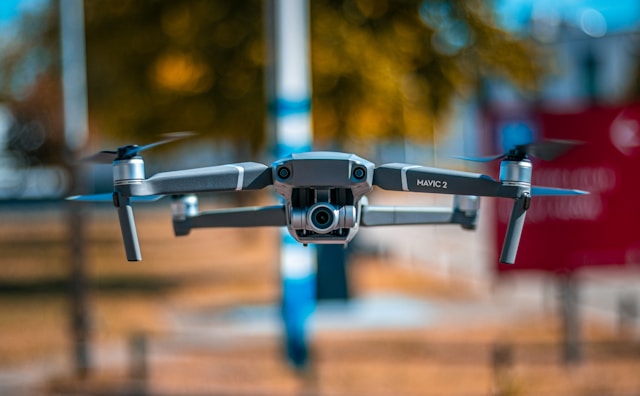
How to Fly a Drone
Flying a drone involves mastering four basic controls: throttle (altitude), yaw (rotation), pitch (forward/backward), and roll (left/right). Beginners should start in an open area, practice hovering at low altitude, and gradually progress to basic maneuvers. Understanding your drone's flight modes and safety features makes learning faster and prevents crashes.
Learning how to fly a drone opens up possibilities from aerial photography to professional services. Modern consumer drones include intelligent flight modes and obstacle avoidance that make flying accessible to complete beginners, but understanding fundamental controls remains essential for safe operation.
This guide covers everything you need for your first flight: understanding controls, preparing your drone, executing basic maneuvers, and following regulations. Whether you purchased a beginner-friendly drone or received one as a gift, these fundamentals apply to virtually all multirotor aircraft.
Understanding drone controls
Every drone controller uses two joysticks that control four primary movements. Learning these controls forms the foundation of all drone piloting skills.
The left stick
Throttle controls altitude. Pushing the left stick up increases motor speed, lifting the drone higher. Pulling down reduces throttle, lowering the drone. The throttle does not center automatically on most controllers, meaning the drone maintains its altitude when you release the stick.
Yaw controls rotation. Moving the left stick left or right rotates the drone clockwise or counterclockwise without changing its position. Yaw allows you to point the camera in different directions while hovering in place.
The right stick
Pitch controls forward and backward movement. Pushing the right stick forward tilts the drone nose-down, causing it to fly forward. Pulling back tilts the nose up, moving the drone backward. The right stick automatically returns to center when released.
Roll controls lateral movement. Pushing the right stick left or right tilts the drone in that direction, causing sideways flight. Combined with pitch, roll allows you to fly in any horizontal direction.
Control summary
| Control | Stick | Direction | Drone Movement |
|---|---|---|---|
| Throttle | Left | Up/Down | Ascend/Descend |
| Yaw | Left | Left/Right | Rotate in place |
| Pitch | Left | Up/Down | Forward/Backward |
| Roll | Right | Left/Right | Strafe left/right |
Practice each control individually before combining movements. Smooth, gradual stick inputs produce stable flight, while jerky movements cause erratic behavior.
Pre-flight preparation
Proper preparation prevents most beginner crashes. Follow a consistent pre-flight checklist before every flight.
Battery and power
Charge both drone and controller batteries fully. Most drones display battery percentage on the controller screen or through the companion app. Plan to land with at least 20-30% battery remaining to ensure safe return-to-home capability.
Physical inspection
Check propellers for cracks, chips, or damage. Damaged props cause vibration and instability. Verify props are securely attached and spinning freely. Inspect the drone body for loose screws, damaged gimbal mounts, or debris in motors.
Firmware and calibration
Update firmware before flying a new drone. Manufacturers regularly release updates that fix bugs and improve flight performance. Follow your drone's manual to calibrate the compass and IMU when prompted. Proper calibration prevents erratic flight behavior and GPS issues.
Environment check
Select an open area away from people, vehicles, and obstacles. Parks, sports fields, and rural areas provide ideal learning environments. Check the best places to fly drones near you and verify the location is legal for drone operations.
Review weather conditions before flying. Wind speeds above 15-20 mph challenge beginners and drain batteries faster. Avoid flying in rain, fog, or extreme temperatures that affect battery performance.
App setup
Connect your phone or tablet to the controller and launch the manufacturer's app. Verify GPS signal strength and satellite count. Most drones require 8+ satellites for stable GPS flight. Check that no-fly zones do not restrict your chosen location.
Your first takeoff
With preparation complete, you are ready for your first flight.
Position the drone
Place the drone on a flat, level surface at least 10 feet away from yourself and any obstacles. Face the drone away from you so the camera points in the direction of intended flight. This orientation makes controls intuitive for beginners.
Power sequence
Turn on the controller first, then power on the drone. Wait for the drone to complete its startup sequence, which typically includes motor tests and sensor calibration. The app will indicate when the drone is ready for flight.
Takeoff options
Auto takeoff: Most drones offer one-button takeoff that lifts the aircraft to a preset hover height, typically 4-6 feet. This option provides consistent, controlled takeoffs ideal for beginners.
Manual takeoff: Push the throttle stick slowly upward until the drone lifts off. Continue raising throttle until reaching a comfortable hover height of 5-10 feet. This method requires more practice but gives you direct control.
Initial hover
After takeoff, release all controls and observe the drone. A properly calibrated drone should hover in place with minimal drift. If the drone drifts significantly, land and recalibrate the compass before continuing.
Maintain your first hover for 30-60 seconds to build confidence and verify stable operation. Watch battery consumption and observe how the drone responds to wind.
Basic flight maneuvers
Practice these fundamental maneuvers in sequence, mastering each before progressing to the next.
Controlled hovering
Hold a steady hover at 5-10 feet altitude. Make small throttle adjustments to maintain consistent height. Practice for several minutes until hovering feels natural and requires minimal concentration.
Forward and backward flight
Gently push the right stick forward to fly the drone away from you. Stop and hover when the drone reaches 20-30 feet distance. Pull back on the right stick to return the drone toward you. Practice until you can fly smooth, straight lines.
Lateral movement
Push the right stick left to strafe the drone sideways. Stop, hover, then strafe right. Combined with forward/backward movement, you can now position the drone anywhere in front of you.
Rotation
Use the left stick to rotate (yaw) the drone while hovering. Rotate 90 degrees left, pause, then 90 degrees right. Practice until you can point the camera in any direction while maintaining position.
Square pattern
Combine movements to fly a square: forward, strafe right, backward, strafe left, returning to start. This exercise develops coordination between multiple controls and helps you maintain visual line of sight.
Circle pattern
Fly a circular path around a fixed point. This advanced maneuver combines continuous pitch, roll, and yaw adjustments. Start with large, slow circles and gradually reduce size and increase speed as skills improve.
Understanding orientation
The most challenging aspect of drone flying involves controlling the aircraft when it faces toward you.
Nose-out orientation
When the drone faces away from you, controls work intuitively. Push right, and the drone goes right. Push forward, and the drone flies away. This orientation feels natural and should be used primarily during your first flights.
Nose-in orientation
When the drone's camera faces toward you, left and right controls reverse from your perspective. Push the stick right, and the drone appears to move left. This reversal confuses beginners and causes many crashes.
Mental techniques
Think from the drone's perspective: Imagine sitting in the pilot's seat of the drone. Controls always move the drone relative to its orientation, not yours.
Use yaw to reorient: When disoriented, rotate the drone until it faces away from you. This returns controls to intuitive orientation while you regain situational awareness.
Practice nose-in hovering: Once comfortable with basic flight, deliberately hover with the camera facing you. Make small left/right corrections until the reversed controls become natural.
Flight modes explained
Modern drones include multiple flight modes that change how the aircraft responds to controls.
GPS/Normal mode
The standard flight mode uses GPS to maintain position when sticks are released. The drone holds altitude and location automatically, compensating for wind. This mode provides the most stable, beginner-friendly flight experience.
Sport mode
Sport mode increases maximum speed and tilt angles while reducing GPS assistance. The drone responds more aggressively to control inputs. This mode suits experienced pilots seeking dynamic flight but challenges beginners.
Cinematic mode
Cinematic mode slows all movements for smooth video footage. The drone accelerates and decelerates gradually, eliminating jerky motion. This mode helps beginners avoid overcorrection while producing footage suitable for drone photography work.
Tripod mode
Tripod mode drastically reduces speed and control sensitivity. The drone moves slowly and precisely, ideal for indoor flying or tight spaces. This mode provides maximum stability for beginners learning fine control.
ATTI mode
Attitude mode (ATTI) disables GPS positioning, allowing the drone to drift with wind. The aircraft maintains altitude but not horizontal position. This mode requires advanced skills and should be avoided by beginners. Note that GPS failure automatically triggers ATTI mode.
Landing safely
Proper landing technique prevents damage to your drone and surrounding property.
Approach
Position the drone over your intended landing spot at about 10 feet altitude. Verify the landing area is clear of people, animals, and obstacles. Check remaining battery and commit to landing if below 20%.
Descent
Lower throttle gradually to descend at approximately 3-5 feet per second. Faster descents risk hard landings that damage the gimbal or landing gear. Watch for ground effect turbulence when approaching the surface.
Touchdown
Continue gradual descent until the drone touches ground. Hold throttle down for 2-3 seconds to ensure the drone registers landing. Motors should stop automatically, or you can use the motor cutoff command.
Hand catching
Some pilots catch landing drones by hand. This technique requires practice and carries injury risk from spinning propellers. If attempting hand catches, approach from below with palm up, and immediately kill motors upon contact.
Regulations every pilot must know
Understanding regulations prevents legal issues and keeps the airspace safe for everyone.
FAA registration
In the United States, drones weighing over 0.55 pounds (250 grams) require FAA registration before flying. Registration costs $5 for recreational pilots and remains valid for one year. Mark your registration number visibly on the drone exterior.
TRUST certification
Recreational pilots must complete The Recreational UAS Safety Test (TRUST) before flying. This free online test covers basic safety guidelines and airspace rules. Carry proof of completion when flying.
Airspace restrictions
Recreational drones must fly below 400 feet in uncontrolled (Class G) airspace. Flying near airports or in controlled airspace requires authorization through LAANC. Use the FAA's B4UFLY app to check airspace restrictions before flying.
Understanding different types of airspace helps you identify where you can legally fly without authorization.
Remote ID
Drones over 0.55 pounds must broadcast Remote ID information while flying. Most current drones include built-in Remote ID compliance. Check your drone's specifications to verify compliance with current drone regulations.
Going commercial
Flying for business purposes requires Part 107 certification instead of recreational rules. If you plan to earn money from drone services, research the FAA drone license requirements and study for the knowledge test.
Frequently asked questions
How long does it take to learn to fly a drone?
Most beginners achieve basic proficiency within 5-10 hours of practice. You can typically hover and execute simple maneuvers after 1-2 hours. Developing smooth, confident control takes longer. Using a drone simulator before flying a real aircraft accelerates the learning curve significantly.
What is the best drone for beginners?
Entry-level drones from DJI, like the Mini series, offer excellent beginner features including GPS stabilization, obstacle avoidance, and automated flight modes. Drones with obstacle avoidance systems help prevent crashes during the learning phase.
Can I fly my drone anywhere?
No. Airspace restrictions, local ordinances, and private property rights limit where drones can operate. National parks prohibit drone flights. Controlled airspace near airports requires authorization. Always verify legality before flying at a new location using the B4UFLY app or similar tools.
What should I do if my drone flies away?
Activate return-to-home (RTH) immediately using the dedicated button on your controller. If RTH fails, note the last known direction and check the app for GPS coordinates. Many drones record flight logs that show the aircraft's final location. Proper drone maintenance and pre-flight checks minimize flyaway risk.
Implementation considerations
Developing drone piloting skills requires consistent practice and gradual progression. Start with short flights in ideal conditions, building confidence before attempting challenging environments or maneuvers.
Consider these approaches for continued improvement:
Simulator training: Drone simulators provide risk-free practice for developing muscle memory. Many pilots recommend 10+ simulator hours before flying expensive aircraft. Simulators prove especially valuable for practicing emergency procedures and orientation recovery.
Structured skill building: Progress through defined skill levels. Master hovering before attempting movement. Master single-axis movement before combining controls. This structured approach prevents developing bad habits that limit future capabilities.
Join a community: Local flying clubs and online communities provide mentorship, shared knowledge, and safe flying locations. Experienced pilots offer tips specific to your drone model and local conditions. Many eventually pursue drone pilot careers after building recreational experience.
For those interested in professional applications, drone skills translate directly to commercial opportunities in agriculture, construction, utilities, and inspection services. Building fundamental skills now prepares you for advanced training and certification.
In summary
Learning how to fly a drone combines understanding basic controls with consistent practice. The four primary controls of throttle, yaw, pitch, and roll provide complete three-dimensional movement when mastered. Modern flight assistants like GPS stabilization and obstacle avoidance make the learning process safer, but understanding manual control remains essential.
Start with thorough pre-flight preparation, including battery checks, physical inspection, and airspace verification. Execute your first flights in open areas with minimal obstacles, focusing on stable hovering before attempting movement. Progress through basic maneuvers systematically, mastering each before advancing.
Compliance with FAA regulations, including registration, TRUST certification, and airspace rules, keeps your flying legal and contributes to aviation safety. As skills develop, consider professional certification to unlock commercial opportunities in surveying and other fields.
The combination of practice, patience, and respect for safety guidelines transforms beginners into confident pilots capable of capturing stunning aerial footage and providing professional drone services.
Ready to take your drone skills further?
Whether you are just starting or ready to turn your hobby into a profession, proper training and practice build the foundation for safe, capable drone operation.
Start your free trial today - no credit card required.
Or book a demo to see how DroneBundle helps pilots manage their operations with flight logging and equipment tracking.