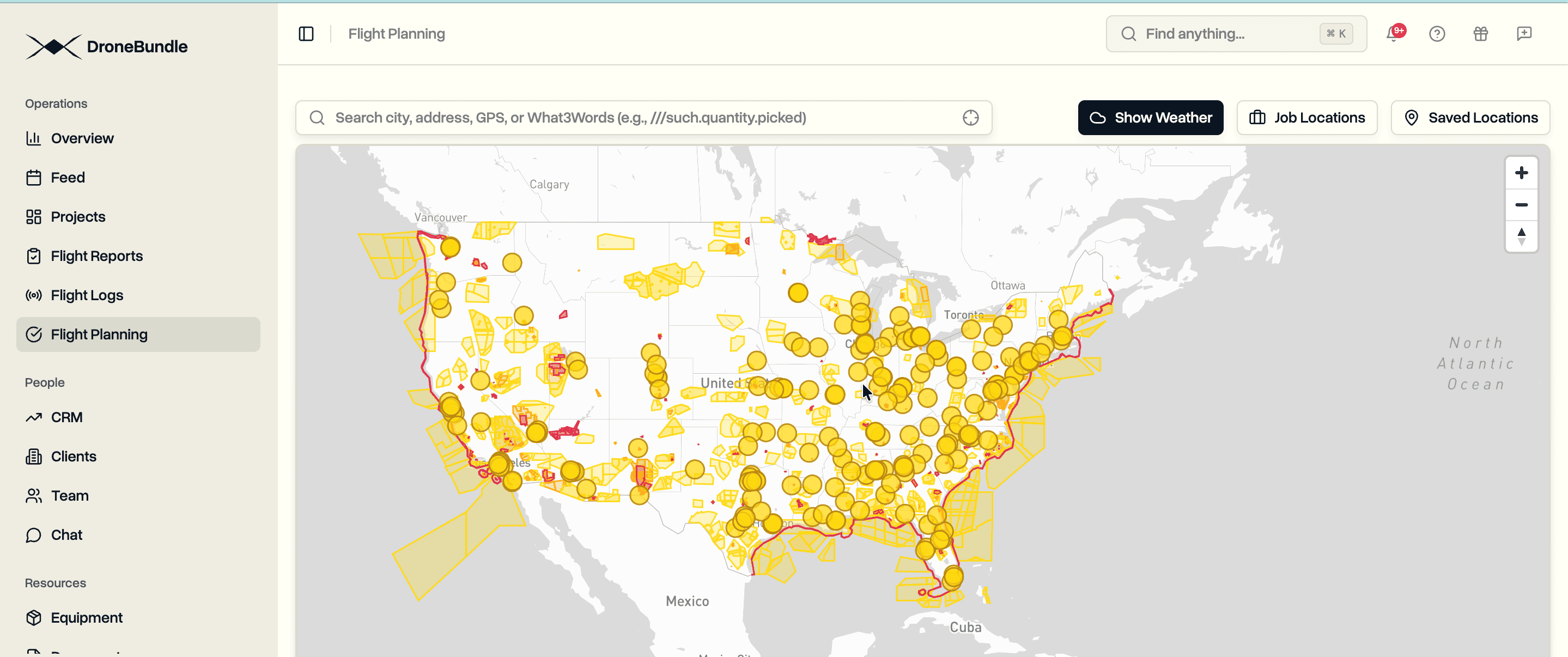
View FAA airspace restrictions directly in DroneBundle before planning your flight. Controlled airspace, prohibited areas, national security zones, and LAANC grids are now visible on the map.
Flying drones commercially in the United States requires understanding complex airspace classifications. Class B, C, D, and E airspace surrounds every airport. National security restrictions protect critical infrastructure. Temporary flight restrictions appear without warning. Part 107 operators must verify airspace authorization requirements before every flight.
The information exists across multiple sources. FAA sectional charts. B4UFLY app. LAANC provider grids. AirMap. Each source shows partial data. None integrates with your flight planning workflow. Operators check multiple tools before confirming a job site is flyable.
DroneBundle now displays FAA airspace data directly in the flight planning interface. Open the map, see the restrictions. No app switching. No separate authorization checks. Airspace status is visible alongside your job locations.
What You See on the Map
The aviation layer pulls from official FAA data sources:
UAS Facility Maps (UASFM). Pre-approved LAANC altitudes near airports. Each grid cell shows the maximum altitude available for automatic authorization. Zero-altitude cells require manual FAA approval.
Prohibited Areas. No-fly zones where drone operations are not permitted. Includes P-40 (Camp David), P-56 (White House), and other restricted airspace.
National Security UAS Flight Restrictions. Permanent restrictions over military installations, nuclear facilities, and critical infrastructure. These zones prohibit all drone operations regardless of Part 107 certification.
Controlled Airspace. Class B, C, D, and E airspace boundaries around airports. Shows where LAANC authorization is required before flight.
Special Use Airspace. Military Operations Areas (MOAs), Restricted Areas, Warning Areas, and Alert Areas. Active schedules vary.
Recreational Fixed Sites. AMA flying fields and other designated recreational areas with special operating rules.
Smart Region Detection
DroneBundle detects your location automatically. US-based operators see American airspace data immediately when opening the map. The system reads your browser's timezone to determine region.
European operators see European airspace first. Pan the map to North America and US data loads automatically. No manual region switching required.
This approach keeps initial load times fast. You see relevant data immediately without downloading airspace information for continents you don't operate in.
How It Works
Open Flight Planning. Navigate to the flight planning section from any project or the main dashboard.
View the Map. Airspace restrictions appear as colored overlays. Red indicates prohibited zones. Orange shows areas requiring authorization. Yellow marks conditional restrictions.
Check Your Location. Click any point on the map to see what restrictions apply. The system analyzes all overlapping airspace and displays relevant details.
Plan Your Flight. Create jobs with full awareness of airspace restrictions. No surprises when you arrive on site.
Use Cases
Infrastructure Inspection. Verify airspace status before bidding jobs near airports or sensitive facilities. Know authorization requirements upfront.
Construction Monitoring. Check if project sites fall within controlled airspace. Plan LAANC submissions for recurring flights.
Real Estate Photography. Confirm flight legality before scheduling shoots. Avoid last-minute cancellations due to airspace restrictions.
Emergency Response. Quickly assess airspace status during incident response. Identify restriction zones affecting operations.
Data Sources
All airspace data comes from official FAA sources updated regularly:
- FAA UAS Data Delivery System
- FAA Digital Aeronautical Chart Supplement
- National Airspace System Resources
- FAA Special Activity Airspace
DroneBundle processes and displays this data without modification. What you see matches official FAA publications.
Availability
USA aviation maps are available now for all DroneBundle users. Access them from the flight planning interface at app.dronebundle.com/flight-planning.
The feature joins existing European airspace coverage for Austria, Cyprus, Denmark, Estonia, Finland, Ireland, Latvia, Lithuania, Spain, Sweden, and Switzerland.
Start your free trial to access aviation maps and complete drone operations management.