A single DroneBundle account can now belong to multiple workspaces. Switch between organizations instantly. Different permissions per workspace.
Drone pilots work for multiple operators. Contractors manage their own business while accessing client workspaces. Pilots hold different roles at different companies. The previous single-workspace limitation forced users to create separate accounts, manage multiple credentials, and switch between browser sessions to access different organizations.
Managing multiple accounts creates operational friction. Separate logins mean separate passwords, separate email addresses, and separate authentication flows. Users lose context when switching between organizations. Flight logs, equipment assignments, and project data remain isolated across accounts.
DroneBundle now supports multiple workspaces per account. Users maintain a single login while belonging to multiple organizations. Each workspace operates independently with its own team members, projects, flights, and permissions.
How Multiple Workspaces Work
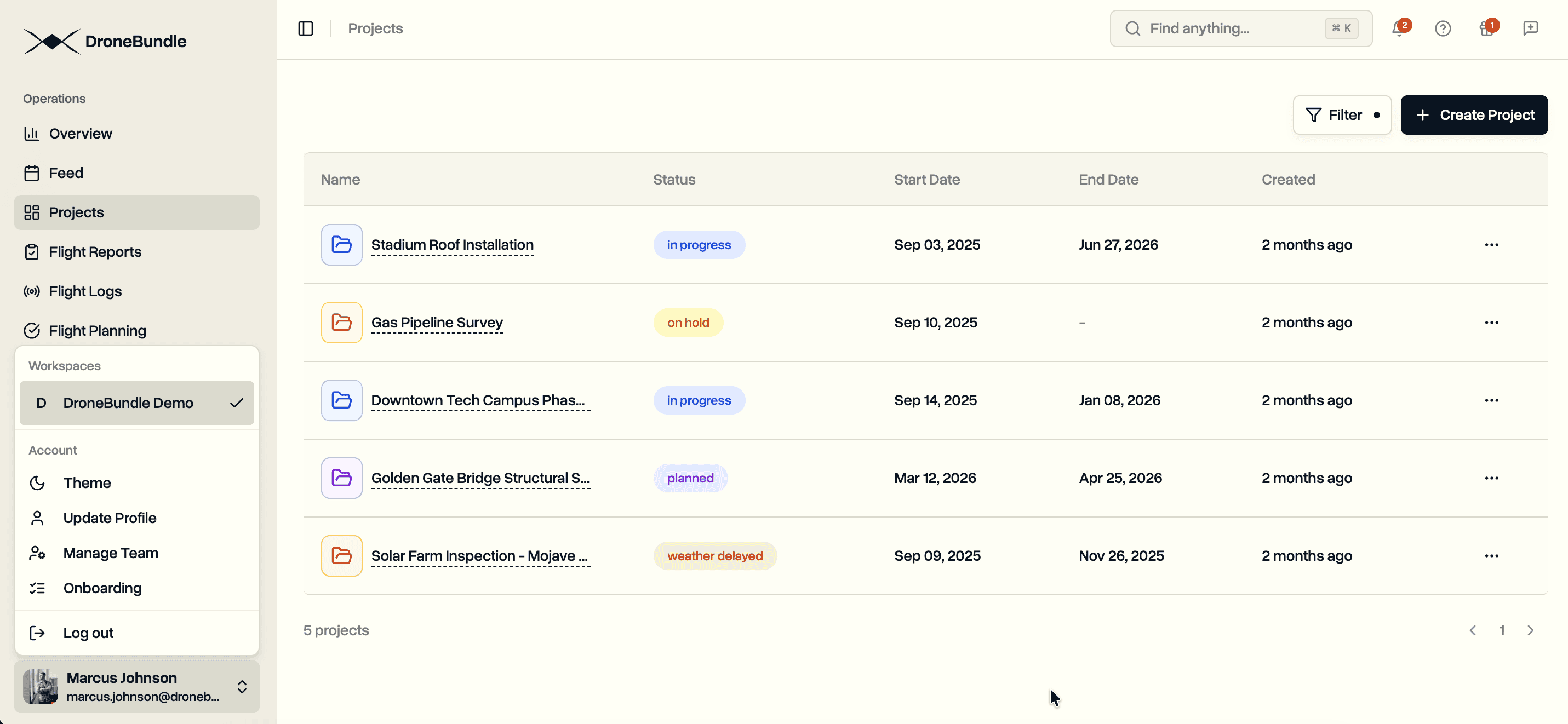
Workspace Switching. Click your profile name in the sidebar to access the workspace switcher. Select any workspace to switch context immediately. All navigation, projects, flights, and team members update to reflect the current workspace.
Role-Based Permissions. Your role changes per workspace. You might be a project manager in your own company's workspace while serving as a pilot in a client's workspace. Permissions adjust automatically when switching workspaces.
Independent Operation. Each workspace maintains separate data. Projects, flights, equipment, and team members exist within workspace boundaries. Switching workspaces switches your entire operational context.
Invitations. When invited to a new workspace, existing DroneBundle users receive email notification with workspace details. Accepting the invitation adds the workspace to your account. New users create an account and gain immediate access to the inviting workspace.
Use Cases
Contractor Operations. Drone service providers manage their internal workspace for equipment, pilots, and client projects. Simultaneously, they access client workspaces to deliver completed missions directly into client systems. Single login. Multiple operational contexts.
Multi-Company Pilots. Pilots working for multiple operators maintain one account across all companies. Flight logs and certifications remain centralized while project assignments exist per employer workspace.
Enterprise Clients. Large organizations grant contractors access to specific project workspaces without exposing internal operations. Contractors deliver work directly to client systems while maintaining their own business workspace.
Seasonal Operations. Pilots move between full-time employment and contract work throughout the year. Access remains available when returning to previous employers.
Workspace Security
Isolation. Workspaces maintain complete data isolation. Users can only access workspaces where they have been invited. Projects, flights, and team members remain private to each workspace.
Role Enforcement. Your role determines what actions you can perform within each workspace. Permissions are enforced separately per workspace.
Audit Trail. Workspace administrators can track team member activities within their workspace.
Availability
Multiple workspace support is available to all DroneBundle users. Existing accounts automatically support multiple workspaces. Workspace administrators can invite team members through the team management interface.
New users can start a free trial with immediate workspace creation. Additional workspace access comes through invitations from existing workspace administrators.
Try the live demo to see workspace management in action.