New Feature
Audit Scheduling: Plan Audits, Run Checklists, Track Findings
audit-schedulingcompliance-checklistaudit-templatesfindings-trackingcorrective-actionscompliance-scoringsafety-managemententerprise
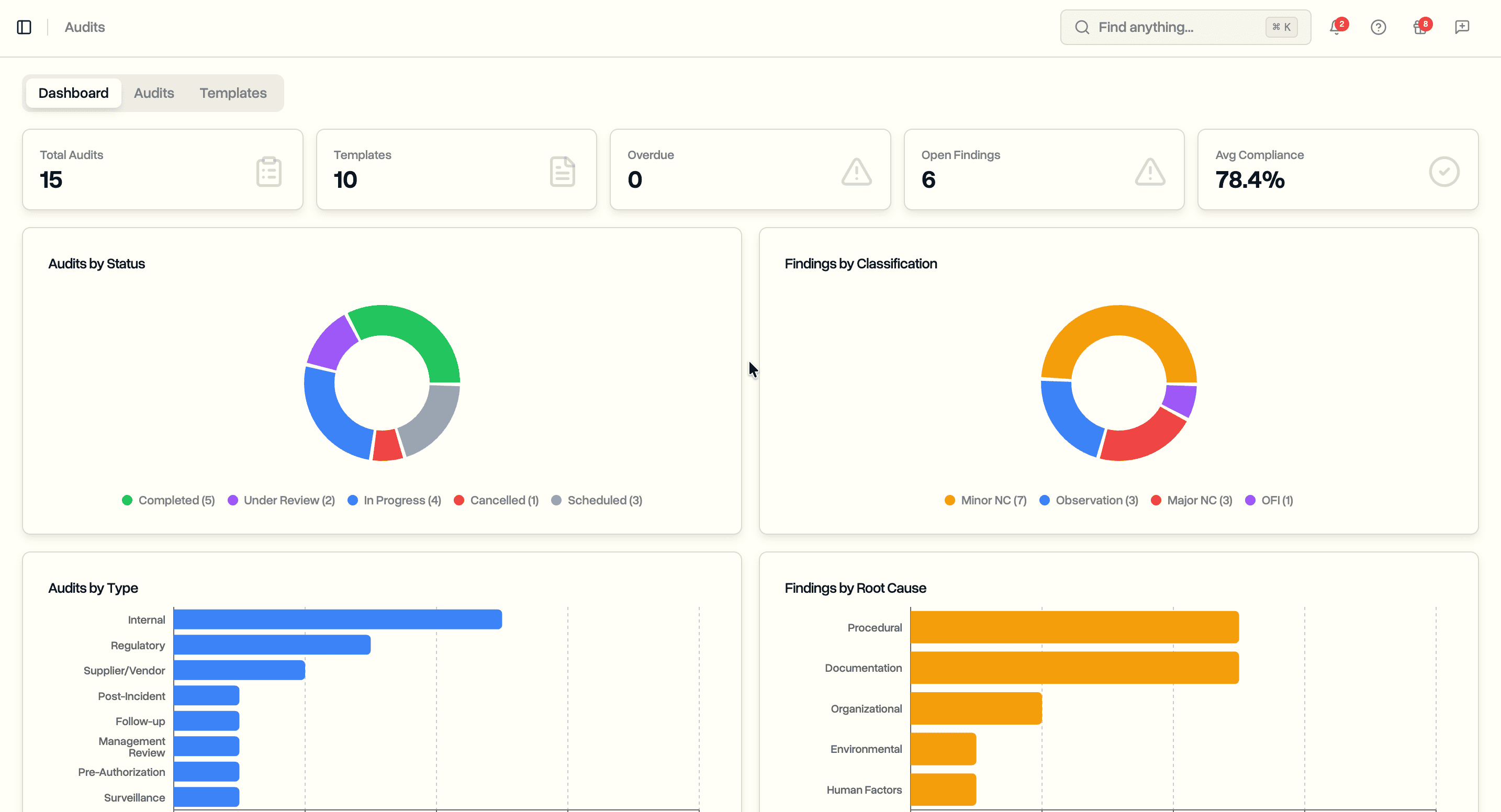
Schedule internal audits with reusable templates. Run compliance checklists. Log findings with root cause analysis. Track corrective actions through to verified completion.
Audit Scheduling (Enterprise)
Plan and execute internal audits across your operation with structured checklists and findings tracking.
- Dashboard with compliance trends, finding breakdowns, overdue audit and action counts, and upcoming audits
- Ten template categories: Safety Management, SORA Compliance, Crew Competence, Technical Airworthiness, Operational Procedures, Emergency Procedures, Record Keeping, Data Protection, Operational Management, Comprehensive
- Eight audit types: Internal, Regulatory, Post-Incident, Supplier/Vendor, Pre-Authorization, Follow-up, Management Review, Surveillance
- Five statuses: Scheduled, In Progress, Under Review, Completed, Cancelled
- Recommended frequency per template: Monthly, Quarterly, Semi-Annual, Annual, Biennial, As Needed
- Filter audits by status or type, templates by category or type
Audit Templates
Build reusable checklist templates with sections, items, and regulatory references.
- Organize questions into collapsible sections with descriptions
- Each item supports: question, regulatory clause, expected evidence, guidance notes, critical flag
- Reorder sections and items with drag handles
- Preview the full checklist before saving
- Version tracking on template updates
- Apply a template when scheduling an audit to pre-populate the checklist
Compliance Checklist
Assess each checklist item during an in-progress audit.
- Five response options: Compliant, Observation, Minor Non-Conformity, Major Non-Conformity, Not Applicable
- Auditor notes and evidence notes per item
- Regulatory clause displayed alongside each question
- Critical items flagged for escalation
- Compliance score calculated automatically: compliant items as a percentage of assessable items
Findings
Log audit findings with structured classification and root cause analysis.
- Four classifications: Major Non-Conformity, Minor Non-Conformity, Observation, Opportunity for Improvement
- Five finding statuses: Open, In Progress, Resolved, Verified, Closed
- Ten root cause categories: Human Factors, Equipment Malfunction, Environmental, Organizational, Procedural, Software, External, Documentation, Training, Unknown
- Resolution deadline tracking
- Link findings to checklist items, risk register entries, or incident reports
Corrective Actions
Track what is being done to address each finding.
- Add corrective actions to any finding
- Action types: Corrective, Preventive, Detective, Containment
- Priority levels: Low, Medium, High, Critical
- Assign a team member and set a deadline
- Track status: Pending, In Progress, Completed
- Record verification method and effectiveness rating
- Overdue actions flagged on the dashboard
Auditor Assignment
- Assign a lead auditor, additional auditors, and an auditee from your team
- Link audits to projects or incidents for context